 PluginStats
jetbrains/teamcity-minimal-agent pulls statistics
By jetbrains (640 listings) · Docker Hub · Integration & delivery
TeamCity Minimal Build Agent
jetbrains/teamcity-minimal-agent has 580,718 recorded pulls on Docker Hub, ranking #292 of 1,265 tracked listings.
About jetbrains/teamcity-minimal-agent
TeamCity Minimal Build Agent

This is an official JetBrains TeamCity minimal build agent image.
<img src="https://raw.githubusercontent.com/JetBrains/teamcity-docker-images/master/docs/media/GitHub.png" height="20" align="center"/> More details about tags and components are here.
The TeamCity build agent connects to the TeamCity server and spawns the actual build processes.
You can use the jetbrains/teamcity-server image to run a TeamCity server. To learn how you can start the TeamCity server together with agents in one go, see these Docker Compose samples.
This minimal image adds just a TeamCity agent without any tools like VCS clients, etc. It is suitable for simple builds and can serve as a base for your custom images. For Java or .NET development we recommend using the default build agent image jetbrains/teamcity-agent.
How to Use This Image
Pull the TeamCity minimal image from the Docker Hub Repository:
jetbrains/teamcity-minimal-agent
and use the following command to start a container with TeamCity agent running inside a Linux container:
docker run -e SERVER_URL="<url to TeamCity server>"  \
    -v <path to agent config folder>:/data/teamcity_agent/conf  \
    jetbrains/teamcity-minimal-agent
or a Windows container:
docker run -e SERVER_URL="<url to TeamCity server>"
    -v <path to agent config folder>:C:/BuildAgent/conf
    jetbrains/teamcity-minimal-agent
where <url to TeamCity server> is the full URL for TeamCity server, accessible by the agent. Note that localhost will not generally not work as it will refer to the localhost inside the container.
<path to agent config folder> is the host machine directory to serve as the TeamCity agent config directory. We recommend providing this binding in order to persist the agent configuration, e.g. authorization on the server. Note that you should map a different folder for every new agent you create.
Since version 2020.1, TeamCity agent Docker images run under a non-root user. Refer to our upgrade notes for information on possible affected use cases.
When you run the agent for the first time, you should authorize it via the TeamCity server UI: go to the Unauthorized Agents page in your browser. See more details.
All information about agent authorization is stored in agent's configuration folder. If you stop the container with the agent and then start a new one with the same config folder, the agent's name and authorization state will be preserved.
TeamCity agent does not need manual upgrade: it will upgrade itself automatically on connecting to an upgraded server.
Agent Image Environment Variables
- SERVER_URL - URL of the TeamCity server agent will connect to
- AGENT_NAME - (optional) Name of the agent in TeamCity UI, autogenerated if omitted
- AGENT_TOKEN - (optional) Agent authorization token, if unset, the agent should be authorized via TeamCity UI.
- OWN_ADDRESS - (optional, linux only) IP address build agent binds to, autodetected
- OWN_PORT - (optional, linux only) Port build agent binds to, 9090 by default
Windows Containers Limitations
The details on the known problems in Windows containers are available in the TeamCity documentation.
Customization
You can customize the image via the usual Docker procedure:
- Run the image
docker run -e SERVER_URL="<url to TeamCity server>"  \
    -v <path to agent config folder>:/data/teamcity_agent/conf  \
    --name="my-customized-agent"  \
    jetbrains/teamcity-minimal-agent  \
- Enter the container
docker exec -it my-customized-agent bash
- Change whatever you need
- Exit and create a new image from the container
docker commit my-customized-agent <the registry where you what to store the image>
License
The image is available under the TeamCity license. TeamCity is free for perpetual use with the limitation of 100 build configurations (jobs) and 3 agents. Licensing details.
Feedback
Report issues of suggestions to the official TeamCity issue tracker.
Other TeamCity Images
Description from the Docker Hub listing.
README badge
Show your rank in a README or on your website. The badge updates automatically.
Charts
Images: 30d · 1y · all time · 1600×900 dark


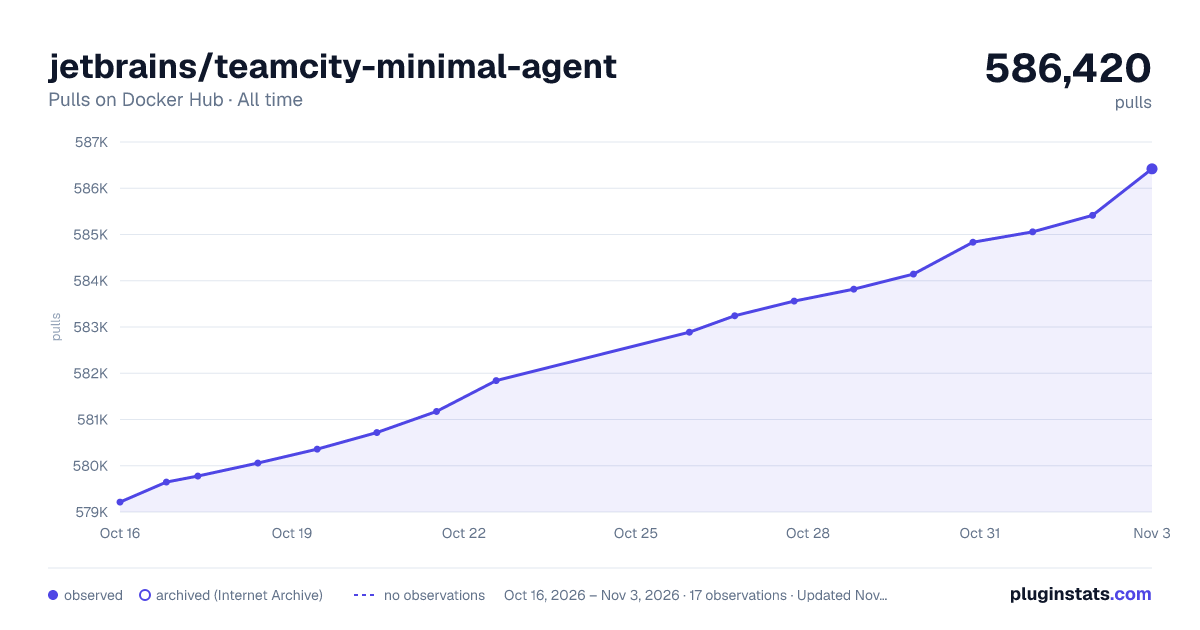

Adoption over time
7/30/90-day growth
Ranking history
Listing placement
Listing placement
Filled points are observed values; hollow points come from Internet Archive snapshots of the listing page. Dashed segments span periods with no observations — values between points are not interpolated.
Each band is one page of 20. Pulls on a linear scale. Placement is projected from pulls, so it can differ from the marketplace's own sort order. Hover a dot to see the listing.
Recent observations
Full history (6)Similar Docker Hub Integration & delivery plugins
All 20 jetbrains/teamcity-minimal-agent alternativesData source
Cumulative pull counts and stars come from the public Docker Hub API. Pulls count image downloads (including automated CI pulls), not installs or users.
Listing: https://hub.docker.com/r/jetbrains/teamcity-minimal-agent. First seen Oct 16, 2026; last successful collection Oct 21, 2026. See the methodology.