 PluginStats
mcp/aws-bedrock-custom-model-import-mcp-server pulls statistics
By mcp (100 listings) · Docker Hub · Machine learning & AI
Manage custom models in Bedrock.
mcp/aws-bedrock-custom-model-import-mcp-server has 14,969 recorded pulls on Docker Hub, ranking #781 of 1,265 tracked listings.
About mcp/aws-bedrock-custom-model-import-mcp-server
AWS Bedrock Custom Model Import MCP Server
Manage custom models in Bedrock.
MCP Info
| Attribute | Details |
|---|---|
| Docker Image | mcp/aws-bedrock-custom-model-import-mcp-server |
| Author | awslabs |
| Repository | https://github.com/awslabs/mcp |
Image Building Info
| Attribute | Details |
|---|---|
| Dockerfile | https://github.com/awslabs/mcp/blob/76ec6993aec4c6281e5250cbeba8db6a5863f2ff/src/aws-bedrock-custom-model-import-mcp-server/Dockerfile |
| Docker Image built by | Docker Inc. |
| Docker Scout Health Score | |
| Verify Signature | COSIGN_REPOSITORY=mcp/signatures cosign verify mcp/aws-bedrock-custom-model-import-mcp-server --key https://raw.githubusercontent.com/docker/keyring/refs/heads/main/public/mcp/latest.pub |
| Licence | Apache License 2.0 |
Available Tools (6)
| Tools provided by this Server | Short Description |
|---|---|
create_model_import_job | Create a model import job to import a model into Amazon Bedrock. |
delete_imported_model | Delete an imported model from Amazon Bedrock. |
get_imported_model | Get imported model details from Amazon Bedrock. |
get_model_import_job | Get model import job details from Amazon Bedrock. |
list_imported_models | List imported models in Amazon Bedrock. |
list_model_import_jobs | List model import jobs in Amazon Bedrock. |
Tools Details
Tool: create_model_import_job
Create a model import job to import a model into Amazon Bedrock.
This tool creates a model import job in Amazon Bedrock to import a custom model. The job name and model name are mandatory parameters. The S3 URI for the model data source is optional and will be automatically inferred from the model name if not provided.
Usage Instructions
- Create descriptive job and model names based on the model you want to import
- The tool itself will automatically add a timestamp suffix to distinguish names from multiple imports
- Example: For a LLAMA-2 model, use "llama-2-import-job" and "llama-2" for job name and model name respectively
- The S3 URI is NOT required - it will be automatically inferred from the model name
- For advanced configurations, you can optionally specify:
- Role ARN for permissions
- VPC configuration for secure imports
- KMS key for encryption
- Tags for resource organization
Best Practices
- Use clear, descriptive names for both jobName and importedModelName
- Name the model based on its architecture and purpose (e.g., "llama-2-7b-chat")
- When importing multiple versions of the same model, use consistent naming with version indicators
Parameters|Type|Description
-|-|-
request|string|The model import job request containing job name, model name, and optional parameters
Tool: delete_imported_model
Delete an imported model from Amazon Bedrock.
This tool permanently deletes a custom model that was previously imported into Amazon Bedrock. This operation cannot be undone and will permanently remove the model from your AWS account.
Usage Instructions
- Provide either the model name or ARN as the model_identifier parameter
- You can get a list of available models using the list_imported_models tool
- Verify you're deleting the correct model before proceeding
Important Considerations
- This operation is IRREVERSIBLE - the model will be permanently deleted
- Any applications using this model will fail after deletion
- Consider backing up important model data before deletion
- Deletion may take some time to complete for large models
When to Use
- When you no longer need a specific model
- To manage costs by removing unused models
Parameters|Type|Description
-|-|-
model_identifier|string|The name or ARN of the model to delete
Tool: get_imported_model
Get imported model details from Amazon Bedrock.
This tool retrieves detailed information about a custom model that was previously imported into Amazon Bedrock. If the exact model name is not found, it will attempt to find a close match using approximate matching.
Usage Instructions
- Provide the model name or ARN as the model_identifier parameter
- The tool will attempt to find close matches if the exact name isn't found
Information Returned
- Model ARN and creation time
- Model architecture details
- Whether the model supports chat or instructions
- Custom model units used for billing the model (if applicable)
- KMS key information (if encrypted)
- Import job details and data source
How to Use This Information
- Verify model details before using in applications
- Check if the model supports instruction for chat applications using Bedrock Converse API
- Review the model details to trace model provenance
- Use the model ARN when configuring inference endpoints
Parameters|Type|Description
-|-|-
model_identifier|string|Name or ARN of the model
Tool: get_model_import_job
Get model import job details from Amazon Bedrock.
This tool retrieves detailed information about a model import job in Amazon Bedrock. If the exact job name is not found, it will attempt to find a close match.
Usage Instructions
- Provide the job name or ARN as the job_identifier parameter
- The tool will attempt to find close matches if the exact name isn't found
Information Returned
- Job status (In Progress, Completed, or Failed)
- Creation, modification, and completion timestamps
- Job ARN and failure message (if applicable)
- Model details including name and ARN
- Configuration details including role ARN, data source, VPC config, and KMS key…
Description from the Docker Hub listing.
README badge
Show your rank in a README or on your website. The badge updates automatically.
Charts
Images: 30d · 1y · all time · 1600×900 dark


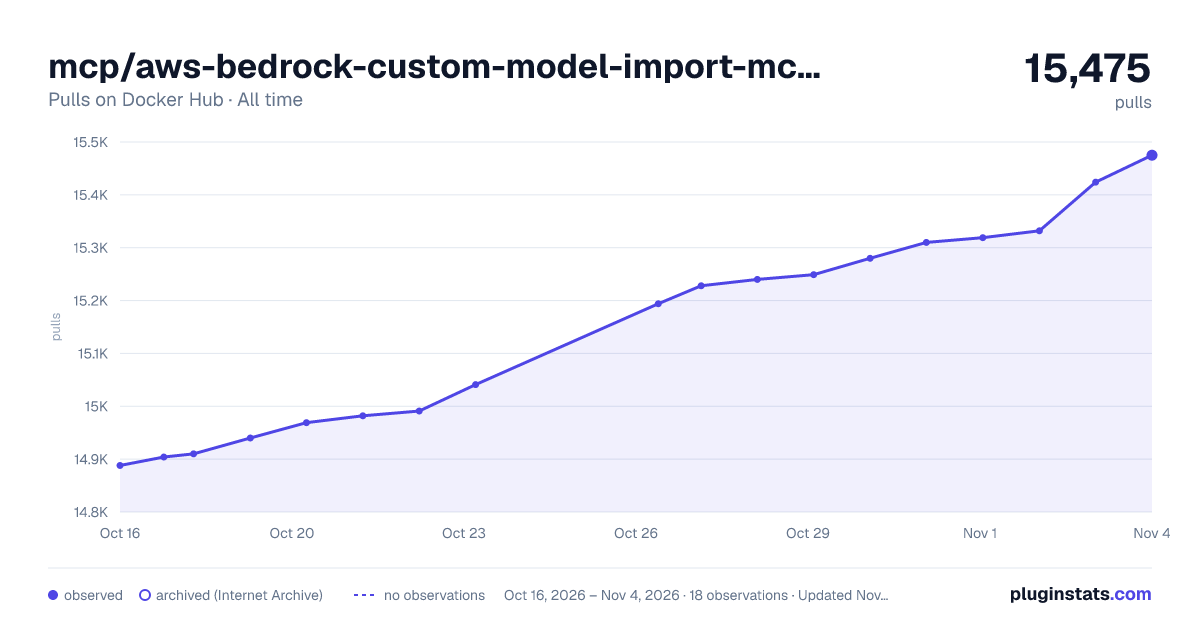

Adoption over time
7/30/90-day growth
Ranking history
Listing placement
Listing placement
Filled points are observed values; hollow points come from Internet Archive snapshots of the listing page. Dashed segments span periods with no observations — values between points are not interpolated.
Each band is one page of 20. Pulls on a linear scale. Placement is projected from pulls, so it can differ from the marketplace's own sort order. Hover a dot to see the listing.
Recent observations
Full history (5)Similar Docker Hub Machine learning & AI plugins
All 20 mcp/aws-bedrock-custom-model-import-mcp-server alternativesData source
Cumulative pull counts and stars come from the public Docker Hub API. Pulls count image downloads (including automated CI pulls), not installs or users.
Listing: https://hub.docker.com/r/mcp/aws-bedrock-custom-model-import-mcp-server. First seen Oct 16, 2026; last successful collection Oct 20, 2026. See the methodology.