 PluginStats
hashicorp/nomad-driver-podman pulls statistics
By hashicorp (104 listings) · Docker Hub · Integration & delivery
hashicorp/nomad-driver-podman has 10,997 recorded pulls on Docker Hub, ranking #896 of 1,263 tracked listings.
About hashicorp/nomad-driver-podman
Nomad podman Driver ==================
Many thanks to @towe75 and Pascom for contributing this plugin to Nomad!
Features
• Use the jobs driver config to define the image for your container • Start/stop containers with default or customer entrypoint and arguments • Nomad runtime environment is populated • Use nomad alloc data in the container. • Bind mount custom volumes into the container • Publish ports • Monitor the memory consumption • Monitor CPU usage • Task config cpu value is used to populate podman CpuShares • Container log is forwarded to Nomad logger • Utilize podmans --init feature • Set username or UID used for the specified command within the container (podman --user option). • Fine tune memory usage: standard nomad memory resource plus additional driver specific swap, swappiness and reservation parameters, OOM handling • Supports rootless containers with cgroup V2
Building The Driver from source
This project has a go.mod definition. So you can clone it to whatever directory you want. It is not necessary to setup a go path at all. Ensure that you use go 1.13 or newer.
Runtime dependencies
• Nomad 0.9+ • Linux host with podman installed • For rootless containers you need a system supporting cgroup V2 and a few other things, follow this tutorial
You need a varlink enabled podman binary and a system socket activation unit, see https://podman.io/blogs/2019/01/16/podman-varlink.html.
nomad agent, nomad-driver-podman and podman will reside on the same host, so you do not have to worry about the ssh aspects of podman varlink.
Ensure that nomad can find the plugin, see plugin_dir
Driver Configuration
• volumes stanza: • enabled - Defaults to true. Allows tasks to bind host paths (volumes) inside their container. • selinuxlabel - Allows the operator to set a SELinux label to the allocation and task local bind-mounts to containers. If used with volumes.enabled set to false, the labels will still be applied to the standard binds in the container. • gc stanza: • container - Defaults to true. This option can be used to disable Nomad from removing a container when the task exits. • recover_stopped (bool) Defaults to true. Allows the driver to start and resuse a previously stopped container after a Nomad client restart. Consider a simple single node system and a complete reboot. All previously managed containers will be reused instead of disposed and recreated. • socket_path (string) Defaults to "unix://run/podman/io.podman" when running as root or a cgroup V1 system, and "unix://run/user//podman/io.podman" for rootless cgroup V2 systems
Task Configuration
• image - The image to run, • entrypoint - (Optional) The entrypoint for the container. Defaults to the entrypoint set in the image. • command - (Optional) The command to run when starting the container. • args - (Optional) A list of arguments to the optional command. If no command is specified, the arguments are passed directly to the container. • working_dir - (Optional) The working directory for the container. Defaults to the default set in the image. • volumes - (Optional) A list of host_path:container_path strings to bind host paths to container paths. • tmpfs - (Optional) A list of /container_path strings for tmpfs mount points. See podman run --tmpfs options for details. • hostname - (Optional) The hostname to assign to the container. When launching more than one of a task (using count) with this option set, every container the task starts will have the same hostname. • Forwarding and Exposing Ports - (Optional) See Docker Driver Configuration for details. • init - Run an init inside the container that forwards signals and reaps processes. • init_path - Path to the container-init binary. • user - Run the command as a specific user/uid within the container. See Task configuration • memory_reservation - Memory soft limit (nit = b (bytes), k (kilobytes), m (megabytes), or g (gigabytes))
After setting memory reservation, when the system detects memory contention or low memory, containers are forced to restrict their consumption to their reservation. So you should always set the value below --memory, otherwise the hard limit will take precedence. By default, memory reservation will be the same as memory limit.
• memory_swap - A limit value equal to memory plus swap. The swap LIMIT should always be larger than the memory value.
Unit can be b (bytes), k (kilobytes), m (megabytes), or g (gigabytes). If you don't specify a unit, b is used. Set LIMIT to -1 to enable unlimited swap.
• memory_swappiness - Tune a container's memory swappiness behavior. Accepts an integer between 0 and 100. • network_mode - Set the network mode for the container. • bridge: (default for rootful) create a network stack on the default bridge • none: no networking • container:id: reuse another container's network stack • host: use the Podman host network stack. Note: the host mode gives the container full access to local system services such as D-bus and is therefore considered insecure • slirp4netns: use slirp4netns to create a user network stack. This is the default for rootless containers. Podman currently does not support it for root containers issue.
Example job
Rootless on ubuntu
edit /etc/default/grub to enable cgroups v2
sudo update-grub
ensure that podman varlink is running
ensure that you have a recent version of crun
nomad job run example.nomad
verify podman ps
Description from the Docker Hub listing.
README badge
Show your rank in a README or on your website. The badge updates automatically.
Charts
Images: 30d · 1y · all time · 1600×900 dark


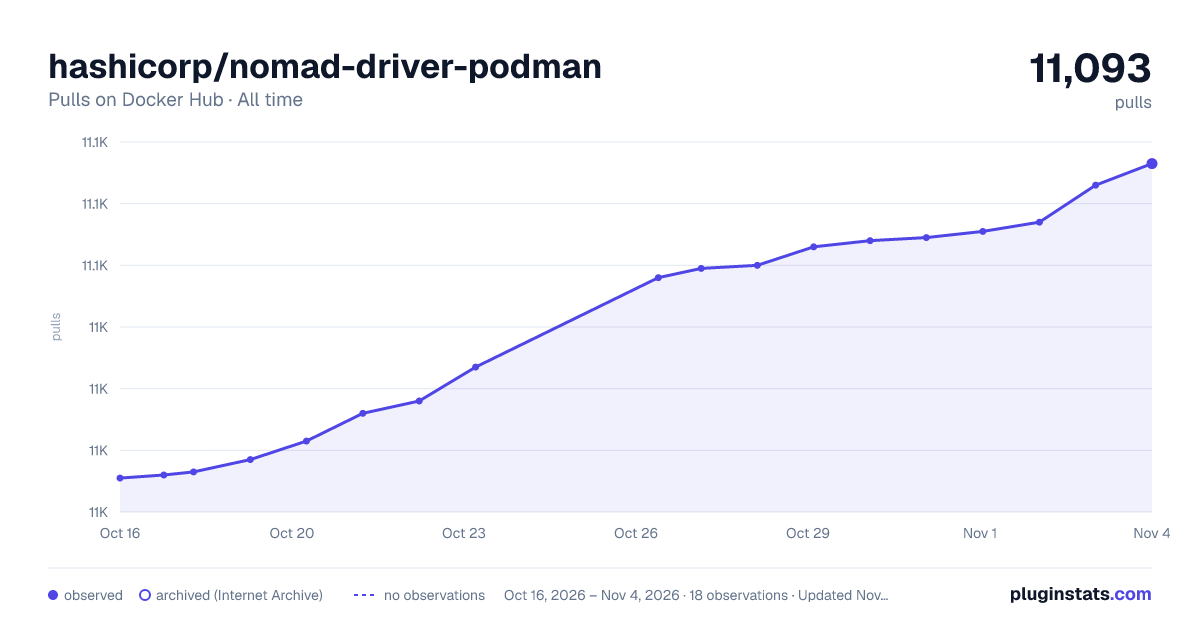

Adoption over time
7/30/90-day growth
Ranking history
Listing placement
Listing placement
Listing placement
Filled points are observed values; hollow points come from Internet Archive snapshots of the listing page. Dashed segments span periods with no observations — values between points are not interpolated.
Each band is one page of 20. Pulls on a linear scale. Placement is projected from pulls, so it can differ from the marketplace's own sort order. Hover a dot to see the listing.
Recent observations
Full history (4)Similar Docker Hub Integration & delivery plugins
All 20 hashicorp/nomad-driver-podman alternativesData source
Cumulative pull counts and stars come from the public Docker Hub API. Pulls count image downloads (including automated CI pulls), not installs or users.
Listing: https://hub.docker.com/r/hashicorp/nomad-driver-podman. First seen Oct 16, 2026; last successful collection Oct 19, 2026. See the methodology.