 PluginStats
localstack/localstack-pro pulls statistics
By localstack (61 listings) · Docker Hub · Developer tools
LocalStack Pro is an easy-to-use cloud emulation framework for dev, testing, and experimentation!
localstack/localstack-pro has 6,237,456 recorded pulls on Docker Hub.
It ranks #164 of 1,263 tracked Docker Hub listings by pulls.
PluginStats has 3 daily observations since Oct 16, 2026; the latest is from Oct 18, 2026.
About localstack/localstack-pro
Overview
LocalStack for AWS is a cloud service emulator that runs in a single container on your laptop or in your CI environment. With LocalStack for AWS, you can run your AWS applications or Lambdas entirely on your local machine without connecting to a remote cloud provider! Whether you are testing complex CDK applications or Terraform configurations, or just beginning to learn about AWS services, LocalStack for AWS helps speed up and simplify your testing and development workflow.
LocalStack for AWS also provides additional features to make your life as a cloud developer easier! Check out the tooling documentation for more information.
Installation
To install LocalStack for AWS, refer to our installation guide and auth token guide.
Usage
LocalStack for AWS image includes the full suite of emulated AWS services and several advanced features. You need to provide an Auth Token to start the LocalStack for AWS image successfully. The Auth Token is a personal identifier used for user authentication outside the LocalStack Web Application, particularly in conjunction with the LocalStack for AWS core cloud emulator. Its primary functions are to retrieve the user’s license and enable access to licensed features depending on your pricing tier. You can find more information on how to setup an Auth Token on our Auth Token documentation. You can locate your Auth Token on the Auth Token page in the LocalStack Web Application.
To start using LocalStack for AWS, check out our documentation at docs.localstack.cloud.
• LocalStack Configuration • LocalStack in CI • LocalStack Integrations • LocalStack Tooling • Frequently Asked Questions
To use LocalStack for AWS with a graphical user interface, you can use the following UI clients:
• LocalStack Web Application • LocalStack Desktop App • LocalStack Docker Extension
Docker Compose
You can start LocalStack with Docker Compose by configuring a docker-compose.yml file. Currently, docker-compose version 1.9.0+ is supported.
Start the container by running the following command:
Create an ECR registry with LocalStack's awslocal CLI:
Notes
• This command pulls the latest image that is built on every commit. Please refer to Base Image Tags to select the image tag you want to use. • Mounting the Docker socket /var/run/docker.sock as a volume is required for the Lambda service. Check out the Lambda providers documentation for more information.
Please note that there are a few pitfalls when configuring your stack manually via docker-compose (e.g., required container name, Docker network, volume mounts, and environment variables). If you want to avoid this manual configuration, we recommend using the lstk CLI, which takes care of authentication, configuration, and container setup for you:
If you configure the container manually, check your setup against the Configuration documentation.
Docker CLI
You can directly start the LocalStack for AWS container using the Docker CLI. This method requires more manual steps and configuration, but it gives you more control over the container settings.
You can start the Docker container simply by executing the following docker run command:
Create a CloudFormation Stack named as cfn-quickstart-stack.yaml.
You can deploy the CloudFormation stack using the AWS CLI with the deploy command. The deploy command creates and updates CloudFormation stacks. Run the following command to deploy the stack:
Notes
• This command reuses the image if it’s already on your machine, i.e. it will not pull the latest image automatically from Docker Hub. • This command does not bind all ports that are potentially used by LocalStack, nor does it mount any volumes. When using Docker to manually start LocalStack, you will have to configure the container on your own (see docker-compose.yml and Configuration). This could be seen as the “expert mode” of starting LocalStack. If you are looking for a simpler method of starting LocalStack, please use the lstk CLI.
Releases
Please refer to the changelog to see the complete list of changes for each release.
Base Image Tags
We do push a set of different image tags for the LocalStack Docker images. When using LocalStack, you can decide which tag you want to use.These tags have different semantics and will be updated on different occasions:
• latest (default) • This is our default tag. It refers to the latest commit which has been fully tested using our extensive integration test suite. • This also entails changes that are part of major releases, which means that this tag can contain breaking changes. • This tag should be used if you want to stay up-to-date with the latest changes. • stable • This tag refers to the latest tagged release. It will be updated with every release of LocalStack. • This also entails major releases, which means that this tag can contain breaking changes. • This tag should be used if you want to stay up-to-date with releases, but don't necessarily need the latest and greatest changes right away.
LocalStack versions now follow this scheme:
YYYY.MM.patch
• YYYY is the full four-digit year (e.g., 2026). • MM is the two-digit month (01 through 12). • patch is a number starting from 0 that increments with each fix released within a given month.
So the March 2026 release is 2026.03.0. A fix released later that month would be 2026.03.1, then 2026.03.2, and so on. When the April release ships, the version resets to 2026.04.0.
Where to get help
Get in touch with the LocalStack Team to report 🐞 issues, upvote 👍 feature requests, 🙋🏽 ask support questions, or 🗣️ discuss local cloud development in our LocalStack Slack Community.
Description from the Docker Hub listing.
Where localstack/localstack-pro sits in the listing
Each band is one page of 20. Pulls on a log scale. Placement is projected from pulls, so it can differ from the marketplace's own sort order. Hover a dot to see the listing.


Charts
Images: 30d · 1y · all time · 1600×900 dark


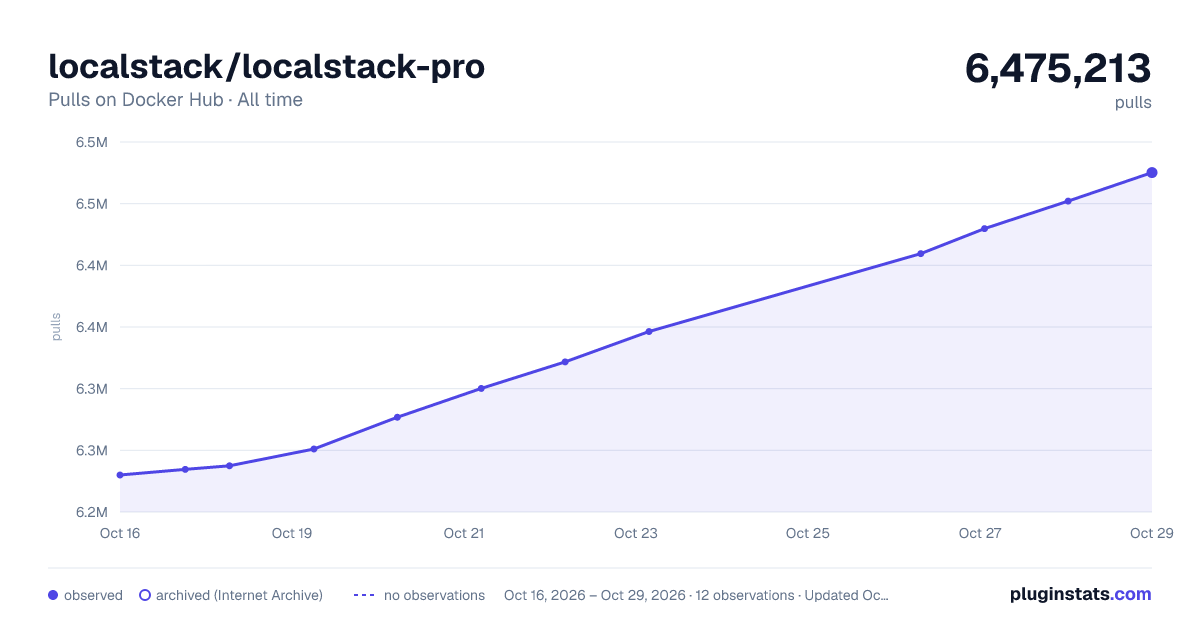

Adoption over time


7/30/90-day growth


Filled points are observed values; hollow points come from Internet Archive snapshots of the listing page. Dashed segments span periods with no observations — values between points are not interpolated.
Recent observations
Full history (3)Similar Docker Hub Developer tools plugins
Data source
Cumulative pull counts and stars come from the public Docker Hub API. Pulls count image downloads (including automated CI pulls), not installs or users.
Listing: https://hub.docker.com/r/localstack/localstack-pro. First seen Oct 16, 2026; last successful collection Oct 18, 2026. See the methodology.