 PluginStats
arangodb pulls statistics
Docker Hub · Databases & storage
ArangoDB - a scalable graph database system to drive value from connected data, faster.
arangodb has 41,635,659 recorded pulls on Docker Hub, ranking #72 of 1,265 tracked listings.
About arangodb
Quick reference
-
Maintained by:
ArangoDB -
Where to get help:
the Docker Community Slack, Server Fault, Unix & Linux, or Stack Overflow
Supported tags and respective Dockerfile links
Quick reference (cont.)
-
Where to file issues:
https://github.com/arangodb/arangodb-docker/issues -
Published image artifact details:
repo-info repo'srepos/arangodb/directory (history)
(image metadata, transfer size, etc) -
Image updates:
official-images repo'slibrary/arangodblabel
official-images repo'slibrary/arangodbfile (history) -
Source of this description:
docs repo'sarangodb/directory (history)
What is ArangoDB?
ArangoDB is a scalable graph database system to drive value from connected data, faster. Native graphs, an integrated search engine, and JSON support, via a single query language.
ArangoDB runs everywhere: On-prem, in the cloud, and as a managed cloud service: ArangoGraph Insights Platform.

Key Features in ArangoDB
Native Graph Store both data and relationships, for faster queries even with multiple levels of joins and deeper insights that simply aren't possible with traditional relational and document database systems.
Document Store Every node in your graph is a JSON document: flexible, extensible, and easily imported from your existing document database.
ArangoSearch Natively integrated cross-platform indexing, text-search and ranking engine for information retrieval, optimized for speed and memory.
ArangoDB Documentation
How to use this image
Start an ArangoDB instance
In order to start an ArangoDB instance, run:
docker run -d -p 8529:8529 -e ARANGO_RANDOM_ROOT_PASSWORD=1 --name arangodb-instance arangodb
Docker chooses the processor architecture for the image that matches your host CPU by default. If this is not the case, for example, because you have the DOCKER_DEFAULT_PLATFORM environment variable set to a different architecture, you can pass the --platform flag to the docker run command to specify the appropriate operating system and architecture for the container. For x86-64, use linux/amd64. On ARM, especially Apple silicon with no emulation for the required AVX instruction set extension, use linux/arm64/v8:
docker run -d -p 8529:8529 -e ARANGO_RANDOM_ROOT_PASSWORD=1 --name arangodb-instance --platform linux/arm64/v8 arangodb
This creates and launches the arangodb Docker instance as a background process. The Identifier of the process is printed. By default, ArangoDB listens on port 8529 for requests.
In order to get the IP ArangoDB listens on, run:
docker inspect --format '{{ .NetworkSettings.IPAddress }}' arangodb-instance
Initialize the server language
When using Docker, you need to specify the language you want to initialize the server to on the first run in one of the following ways:
-
Set the environment variable
LANGto a locale in thedocker runcommand, e.g.-e LANG=svfor a Swedish locale. -
Use an
arangod.confconfiguration file that sets a language and mount it into the container. For example, create a configuration file on your host system in which you seticu-language = svat the top (before any[section]) and then mount the file over the default configuration file likedocker run -v /your-host-path/arangod.conf:/etc/arangodb3/arangod.conf ....
If you don't specify a language explicitly, the default is en_US up to ArangoDB v3.11 and en_US_POSIX from ArangoDB v3.12 onward.
Using the instance
To use the running instance from an application, link the container:
docker run -e ARANGO_RANDOM_ROOT_PASSWORD=1 --name my-app --link arangodb-instance:db-link arangodb
This uses the instance named arangodb-instance and links it into the application container. The application container contains environment variables, which can be used to access the database.
DB_LINK_PORT_8529_TCP=tcp://172.17.0.17:8529
DB_LINK_PORT_8529_TCP_ADDR=172.17.0.17
DB_LINK_PORT_8529_TCP_PORT=8529
DB_LINK_PORT_8529_TCP_PROTO=tcp
DB_LINK_NAME=/naughty_ardinghelli/db-link
Exposing the port to the outside world
If you want to expose the port to the outside world, run:
docker run -e ARANGO_RANDOM_ROOT_PASSWORD=1 -p 8529:8529 -d arangodb
ArangoDB listen on port 8529 for request and the image includes EXPOSE 8529. The -p 8529:8529 exposes this port on the host.…
Description from the Docker Hub listing.
README badge
Show your rank in a README or on your website. The badge updates automatically.
Charts
Images: 30d · 1y · all time · 1600×900 dark


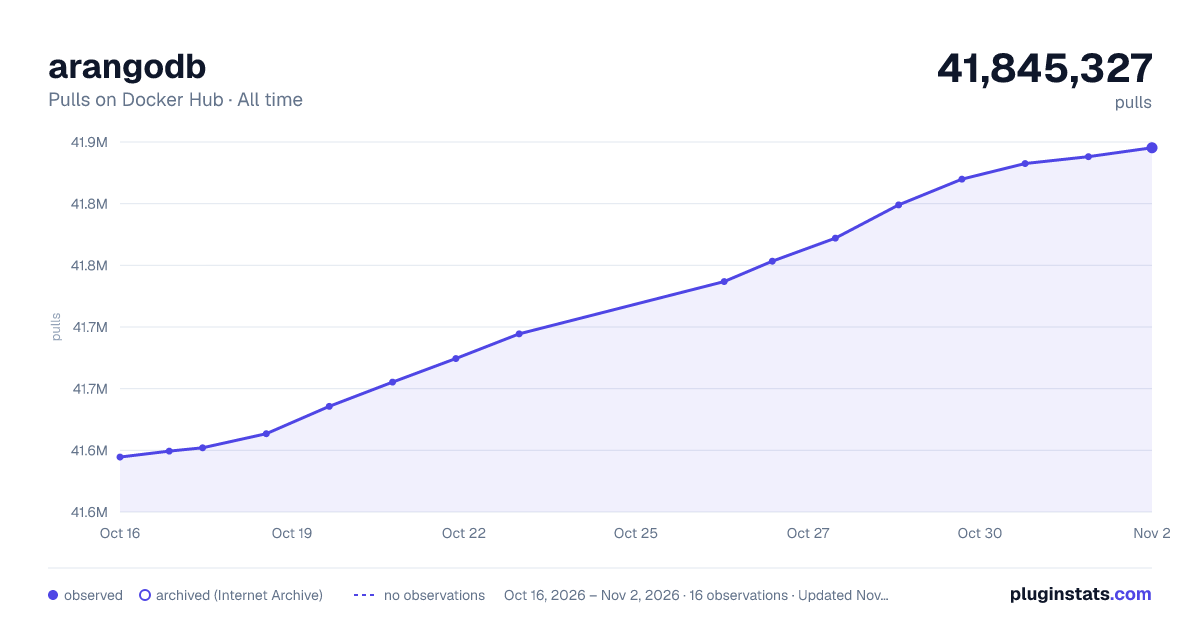

Adoption over time
7/30/90-day growth
Ranking history
Listing placement
Listing placement
Filled points are observed values; hollow points come from Internet Archive snapshots of the listing page. Dashed segments span periods with no observations — values between points are not interpolated.
Each band is one page of 20. Pulls on a linear scale. Placement is projected from pulls, so it can differ from the marketplace's own sort order. Hover a dot to see the listing.
Recent observations
Full history (5)Similar Docker Hub Databases & storage plugins
All 20 arangodb alternativesData source
Cumulative pull counts and stars come from the public Docker Hub API. Pulls count image downloads (including automated CI pulls), not installs or users.
Listing: https://hub.docker.com/_/arangodb. First seen Oct 16, 2026; last successful collection Oct 20, 2026. See the methodology.