 PluginStats
notary pulls statistics
DEPRECATED; Notary server and signer cooperatively handle signing and distribution
notary has 6,754,142 recorded pulls on Docker Hub, ranking #161 of 1,265 tracked listings.
About notary
DEPRECATION NOTICE
The upstream Notary project was archived as of July 30, 2025. For more information, see notaryproject/.github#70.
Quick reference
-
Maintained by:
Docker, Inc. -
Where to get help:
the Docker Community Slack, Server Fault, Unix & Linux, or Stack Overflow
Supported tags and respective Dockerfile links
No supported tags
Quick reference (cont.)
-
Where to file issues:
https://github.com/docker/notary-official-images/issues -
Supported architectures: (more info)
No supported architectures -
Published image artifact details:
repo-info repo'srepos/notary/directory (history)
(image metadata, transfer size, etc) -
Image updates:
official-images repo'slibrary/notarylabel
official-images repo'slibrary/notaryfile (history) -
Source of this description:
docs repo'snotary/directory (history)
How to use this repository
The Notary respository contains two distinct applications, Notary Server, and Notary Signer. The images for these applications are tagged "server-*" and "signer-*" respectively. While the server can be configured to run entirely in memory, this configuration is not be appropriate for a production deployment so you should expect to run both a server and and signer.
Ensure that the images you are running have similar version tags. That is, if you are running the server-0.2.0 tag, you should also be running the similar signer-0.2.0 tag. Running different versions of the server and signer will never be a supported configuration.
Notary Server
The Notary server manages JSON formatted TUF (The Update Framework) metadata for Notary clients and the docker command line tool's Docker Content Trust features. It requires a companion Notary signer instance and a MySQL (or MariaDB) database.
How to use this image
The following sample configuration is included in the image:
{
    "server": {
        "http_addr": ":4443",
        "tls_key_file": "/certs/notary-server.key",
        "tls_cert_file": "/certs/notary-server.crt"
    },
    "trust_service": {
      "type": "remote",
      "hostname": "notarysigner",
      "port": "7899",
      "tls_ca_file": "/certs/root-ca.crt",
      "key_algorithm": "ecdsa",
      "tls_client_cert": "/certs/notary-server.crt",
      "tls_client_key": "/certs/notary-server.key"
    },
    "logging": {
        "level": "info"
    },
    "storage": {
        "backend": "mysql",
        "db_url": "server@tcp(mysql:3306)/notaryserver?parseTime=True"
    }
}
The components you must provide are the certificates and keys, and the links for the notarysigner and mysql hostnames. The root-ca.crt file enables the Notary server to identify valid signers, which it communicates with over mutual TLS using a GRPC interface. The notary-server.crt andnotary-server.key are used to identify this service to both external clients, and signer instances. All the certificate and key files must be readable by the notary user which is created inside the container and owns the notary-server process.
If you require a different configuration, you should wrap this image with your own Dockerfile.
For more details on how to configure your Notary server, please read the docs.
Notary Signer
The Notary signer is a support service for the Notary server. It manages private keys and performs all signing operations. It requires a MySQL (or MariaDB) database.
How to use this image
The following sample configuration is included in the image:
{
    "server": {
        "http_addr": ":4444",
        "grpc_addr": ":7899",
        "tls_cert_file": "/certs/notary-signer.crt",
        "tls_key_file": "/certs/notary-signer.key",
        "client_ca_file": "/certs/notary-server.crt"
    },
    "logging": {
        "level": "info"
    },
    "storage": {
        "backend": "mysql",
        "db_url": "signer@tcp(mysql:3306)/notarysigner?parseTime=True"
    }
}
The components you must provide are the certificates and keys, and the link for the mysql hostname. The notary-server.crt file enables the Notary signer to identify valid servers, which it communicates with over mutual TLS using a GRPC interface. The notary-server.crt andnotary-server.key are used to identify this service to both external clients, and signer instances. All the certificate and key files must be readable by the notary user which is created inside the container and owns the notary-signer process.
If you require a different configuration, you should wrap this image with your own Dockerfile.
For more details on how to configure your Notary signer, please read the docs.
Database Migrations…
Description from the Docker Hub listing.
README badge
Show your rank in a README or on your website. The badge updates automatically.
Charts
Images: 30d · 1y · all time · 1600×900 dark


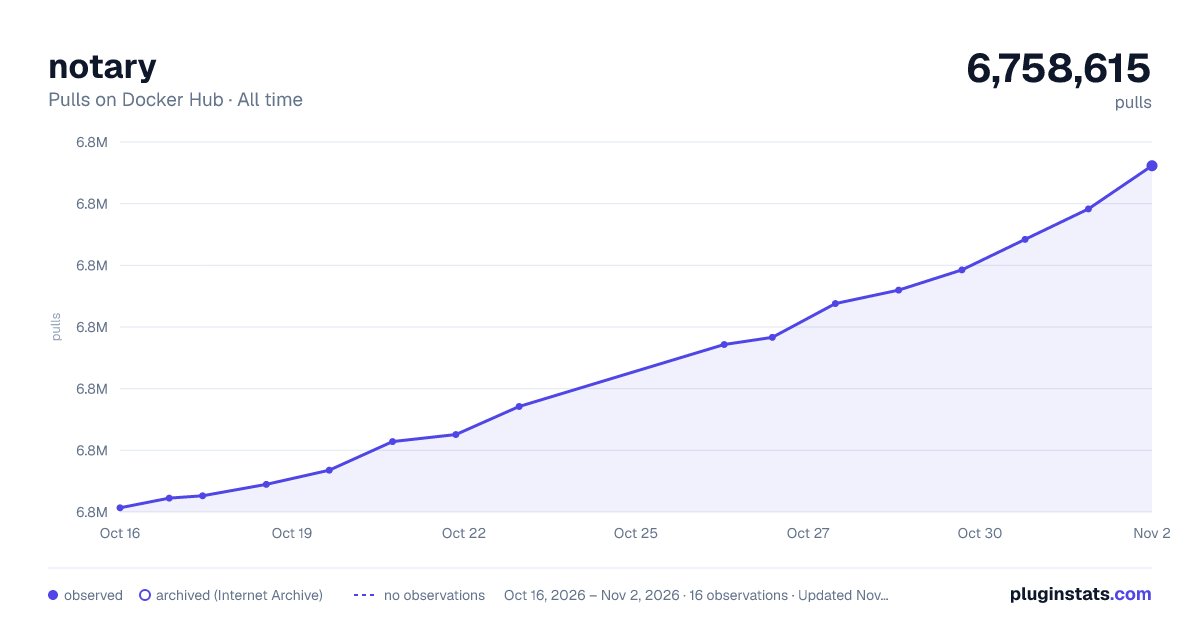

Adoption over time
7/30/90-day growth
Ranking history
Listing placement
Listing placement
Filled points are observed values; hollow points come from Internet Archive snapshots of the listing page. Dashed segments span periods with no observations — values between points are not interpolated.
Each band is one page of 20. Pulls on a linear scale. Placement is projected from pulls, so it can differ from the marketplace's own sort order. Hover a dot to see the listing.
Recent observations
Full history (6)Similar Docker Hub Security plugins
All 20 notary alternativesData source
Cumulative pull counts and stars come from the public Docker Hub API. Pulls count image downloads (including automated CI pulls), not installs or users.
Listing: https://hub.docker.com/_/notary. First seen Oct 16, 2026; last successful collection Oct 21, 2026. See the methodology.