 PluginStats
amazon/aws-cli pulls statistics
By amazon (81 listings) · Docker Hub · Developer tools
Universal Command Line Interface for Amazon Web Services
amazon/aws-cli has 1,546,889,496 recorded pulls on Docker Hub, ranking #9 of 1,267 tracked listings.
About amazon/aws-cli
Amazon Web Services Command Line Interface (AWS CLI)
This is a Docker image for the AWS CLI. It is a unified command line tool to interact with AWS services and manage your AWS resources.
NOTE: This image is only supported for the AWS CLI v2
Tags
There are two sets of supported tags:
-
latest- This corresponds to the latest released version of the AWS CLI. There are no backwards compatibility guarantees in relying on thelatesttag. See notes on backwards compatibility for more information. -
<major.minor.patch>- This corresponds to each released version of the AWS CLI. For example to use version2.0.6of the AWS CLI, use the tag2.0.6. These tags are immutable as they will only ever be pushed to once upon release of a particular version of the AWS CLI.
Docker CLI usage
The AWS CLI can be executed from the Docker CLI with the docker run command:
$ docker run --rm -it amazon/aws-cli --version
This command will print out the version of the AWS CLI being used in the
container. Note that the aws executable was not specified in the docker run
command because the entrypoint
for the image is defined as the aws executable.
For any AWS CLI command, you can run its help command to get help information
about the command:
$ docker run --rm -it amazon/aws-cli help
In order to run a command that makes an AWS API call, credentials and
configuration may need to be shared from the host system to the container.
Assuming credentials and configuration are being set in the
~/.aws/credentials and ~/.aws/config file on the host system,
they can be shared by mounting the ~/.aws directory to the /root/.aws
directory of the container:
$ docker run --rm -ti -v ~/.aws:/root/.aws amazon/aws-cli s3 ls
For some AWS CLI v2 commands, you'll want to either read files from the host
system in the container or write files from the container to the host system.
This can be accomplished by mounting to the container's /aws directory:
$ docker run --rm -ti -v ~/.aws:/root/.aws -v $(pwd):/aws amazon/aws-cli s3 cp s3://aws-cli-docker-demo/hello .
The /aws directory is the working directory for the image and is reserved
for the user. See notes on interfaces
for more information.
In order to shorten the length of docker commands, you can add the following
alias:
$ alias aws='docker run --rm -ti -v ~/.aws:/root/.aws -v $(pwd):/aws amazon/aws-cli'
This will allow you to run the AWS CLI v2 from within a Docker container as if it was installed on the host system:
$ aws --version
Notes on interfaces and backwards compatibility of Docker image
-
The only tool supported on the image is the AWS CLI. Only the
awsexecutable should ever be directly executed. For example even thoughlessandgroffare explicitly installed on the image, they should not be executed directly outside of an AWS CLI command. -
The
/awsworking directory is user controlled. The image will not write to this directory, unless instructed by the user in running a AWS CLI command. -
There are no backwards compatibility guarantees in relying on the
latesttag. For example theoretically, any of the following changes could happen between updates tolatesttag:-
A specific tool (e.g.
lessorgroff) is removed from the image. -
The base image is updated (e.g. change from Amazon Linux to Alpine Linux)
-
A new major version of the AWS CLI is published (e.g. an AWS CLI v3)
-
-
In order to guarantee backwards compatibility, users must pin to a specific
<major.minor.patch>tag as those tags are immutable; they will only ever be pushed to once upon release of a particular version of the AWS CLI.
General AWS CLI usage
For information on general usage of the AWS CLI, please refer to the:
Source code
The source code for the AWS CLI can be found at its
GitHub repository. The Docker image
is built using the Linux exectuable installer
for the AWS CLI v2 and the following Dockerfile.
Feedback
To file any feature requests or report any issues related to this Docker image, please open an issue on the GitHub repository for the AWS CLI.
Description from the Docker Hub listing.
README badge
Show your rank in a README or on your website. The badge updates automatically.
Charts
Images: 30d · 1y · all time · 1600×900 dark


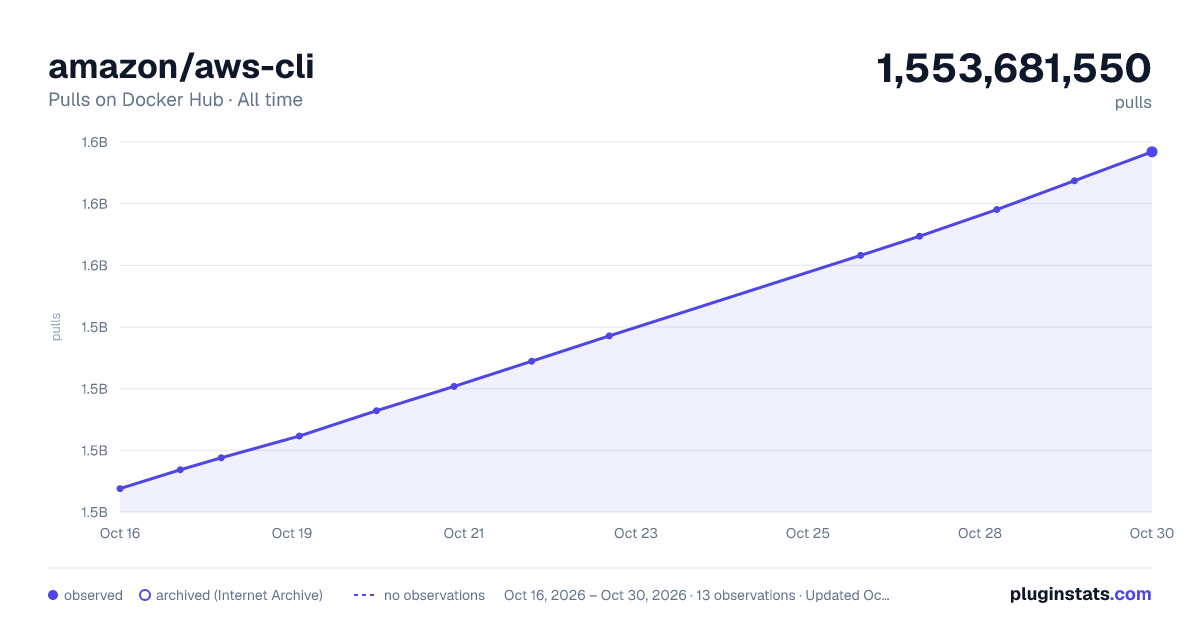

Adoption over time
7/30/90-day growth
Ranking history
Listing placement
Listing placement
Filled points are observed values; hollow points come from Internet Archive snapshots of the listing page. Dashed segments span periods with no observations — values between points are not interpolated.
Each band is one page of 20. Pulls on a linear scale. Placement is projected from pulls, so it can differ from the marketplace's own sort order. Hover a dot to see the listing.
Recent observations
Full history (7)Similar Docker Hub Developer tools plugins
All 20 amazon/aws-cli alternativesData source
Cumulative pull counts and stars come from the public Docker Hub API. Pulls count image downloads (including automated CI pulls), not installs or users.
Listing: https://hub.docker.com/r/amazon/aws-cli. First seen Oct 16, 2026; last successful collection Oct 22, 2026. See the methodology.