 PluginStats
jenkins/ssh-agent pulls statistics
By jenkins (33 listings) · Docker Hub · Integration & delivery
Docker image for Jenkins agents connected over SSH
jenkins/ssh-agent has 59,133,028 recorded pulls on Docker Hub.
It ranks #55 of 1,263 tracked Docker Hub listings by pulls.
PluginStats has 3 daily observations since Oct 16, 2026; the latest is from Oct 18, 2026.
About jenkins/ssh-agent
Docker image for Jenkins agents connected over SSH
A Jenkins agent image which allows using SSH to establish the connection. It can be used together with the SSH Build Agents plugin or other similar plugins.
See Jenkins Distributed builds for more info.
Running
Running with the SSH Build Agents plugin
To run a Docker container
• -d: To start a container in detached mode, use the -d option. Containers started in detached mode exit when the root process used to run the container exits, unless you also specify the --rm option. • --rm: If you use -d with --rm, the container is removed when it exits or when the daemon exits, whichever happens first. • --name: Assigns a name to the container. If you do not specify a name, Docker generates a random name. • --publish 2200:22: Publishes the host port 2200 to the agent container port 22 (SSH) to allow connection from the host with ssh jenkins@localhost -p 2200
Please note none of these options are mandatory, they are just examples.
You will then be able to connect this agent using the SSH Build Agents plugin as "jenkins" with the matching private key.
When using the Linux image, you have to set the value of the Remote root directory to /home/jenkins/agent in the agent configuration UI.
When using the Windows image, you have to set the value of the Remote root directory to C:/Users/jenkins/Work in the agent configuration UI.
If you intend to use another directory than /home/jenkins/agent under Linux or C:/Users/jenkins/Work under Windows, don't forget to add it as a data volume.
How to use this image with Docker Plugin
To use this image with Docker Plugin, you need to pass the public SSH key using environment variable JENKINS_AGENT_SSH_PUBKEY and not as a startup argument.
In _Environment_ field of the Docker Template (advanced section), just add:
JENKINS_AGENT_SSH_PUBKEY=
Don't put quotes around the public key.
Please note that you have to set the value of the Remote File System Root to /home/jenkins/agent in the Docker Agent Template configuration UI.
If you intend to use another directory than /home/jenkins/agent, don't forget to add it as a data volume.
You should be all set.
Extending the image
Should you need to extend the image, you could use something along those lines:
Configurations
The image has several supported configurations, which can be accessed via the following tags:
${IMAGE_VERSION} can be found on the releases page.
• latest, latest-jdk11, jdk11, latest-bullseye-jdk11, bullseye-jdk11, latest-debian-jdk11, debian-jdk11, ${IMAGE_VERSION}, ${IMAGE_VERSION}-jdk11, (Dockerfile) • latest-jdk17, jdk17, latest-bullseye-jdk17, bullseye-jdk17,latest-debian-jdk17, debian-jdk17, ${IMAGE_VERSION}-jdk17, (Dockerfile) • nanoserver-1809, nanoserver-ltsc2019, nanoserver-1809-jdk11, nanoserver-ltsc2019-jdk11, ${IMAGE_VERSION}-nanoserver-1809, ${IMAGE_VERSION}-nanoserver-ltsc2019, ${IMAGE_VERSION}-nanoserver-1809-jdk11, ${IMAGE_VERSION}-nanoserver-ltsc2019-jdk11 (Dockerfile) • windowsservercore-1809, windowsservercore-ltsc2019, windowsservercore-1809-jdk11, windowsservercore-ltsc2019-jdk11, ${IMAGE_VERSION}-windowsservercore-1809, ${IMAGE_VERSION}-windowsservercore-ltsc2019, ${IMAGE_VERSION}-windowsservercore-1809-jdk11, ${IMAGE_VERSION}-windowsservercore-ltsc2019-jdk11 (Dockerfile)
Building instructions
Pre-requisites
Should you want to build this image on your machine (before submitting a pull request for example), please have a look at the pre-requisites:
• A GNU/Linux machine with Docker, a macOS machine with Docker Desktop, or a Windows machine with Docker for Windows installed • Docker BuildX plugin installed on older versions of Docker (from 19.03). Docker Buildx is included in recent versions of Docker Desktop for Windows, macOS, and Linux. Docker Linux packages also include Docker Buildx when installed using the DEB or RPM packages. • GNU Make installed • jq installed • GNU Bash installed • git installed • curl installed
Building
Target images
If you want to see the target images that will be built, you can issue the following command:
Building a specific image
If you want to build a specific image, you can issue the following command:
That would give for JDK 11 on Alpine Linux:
Building all images
Then, you can build all the images by running:
Testing all images
If you want to test the images, you can run:
Testing a specific image
If you want to test a specific image, you can run:
That would give for JDK 11 on Alpine Linux:
Other make targets
show gives us a detailed view of the images that will be built, with the tags, platforms, and Dockerfiles.
bats is a dependency target. It will update the bats submodule and run the tests.
Changelog
See GitHub Releases. Note that the changelogs and release tags were introduced in Dec 2019, and there are no entries for previous releases. Please consult with the commit history if needed.
Description from the Docker Hub listing.
Where jenkins/ssh-agent sits in the listing
Each band is one page of 20. Pulls on a log scale. Placement is projected from pulls, so it can differ from the marketplace's own sort order. Hover a dot to see the listing.


Charts
Images: 30d · 1y · all time · 1600×900 dark


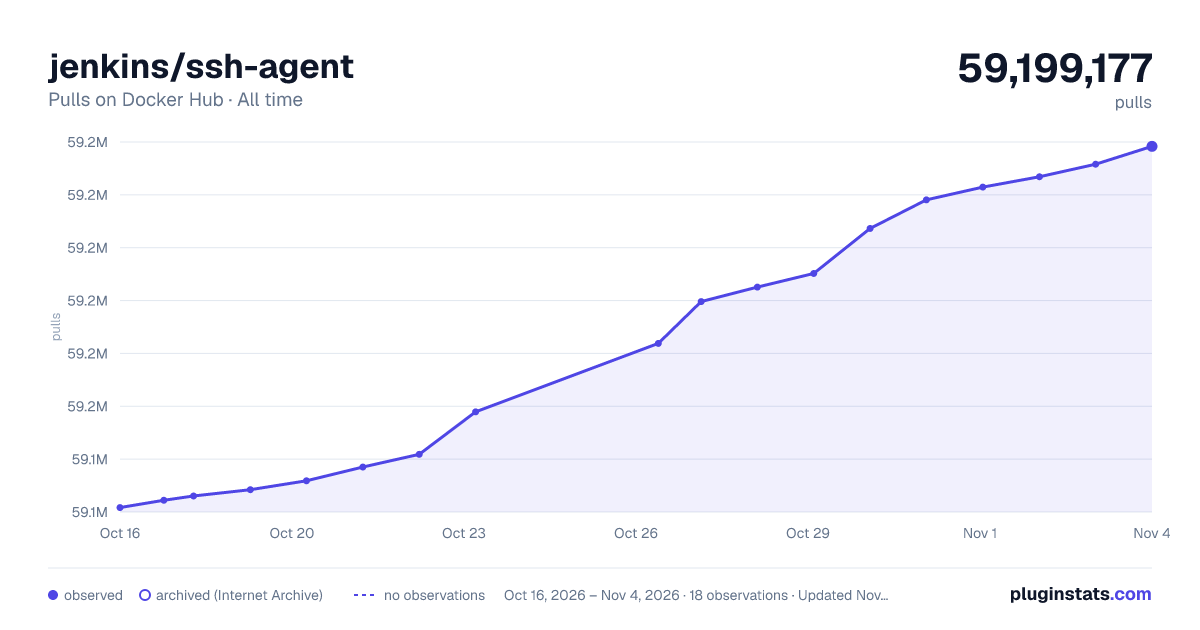

Adoption over time


7/30/90-day growth


Filled points are observed values; hollow points come from Internet Archive snapshots of the listing page. Dashed segments span periods with no observations — values between points are not interpolated.
Recent observations
Full history (3)Similar Docker Hub Integration & delivery plugins
Data source
Cumulative pull counts and stars come from the public Docker Hub API. Pulls count image downloads (including automated CI pulls), not installs or users.
Listing: https://hub.docker.com/r/jenkins/ssh-agent. First seen Oct 16, 2026; last successful collection Oct 18, 2026. See the methodology.