 PluginStats
atlassian/jira-core pulls statistics
By atlassian (66 listings) · Docker Hub
Jira Core is a project and task management solution built for business teams.
atlassian/jira-core has 4,016,177 recorded pulls on Docker Hub, ranking #181 of 1,263 tracked listings.
About atlassian/jira-core
Jira Software Data Center helps the world’s best agile teams plan, track, and release great software at scale.
• Check out atlassian/jira-software on Docker Hub • Learn more about Jira Software: https://www.atlassian.com/software/jira
Jira Service Management Data Center is an enterprise ITSM solution that offers high availability, meeting your security and compliance needs so no request goes unresolved.
• Check out atlassian/jira-servicemanagement on Docker Hub • Learn more about Jira Service Management: https://www.atlassian.com/software/jira/service-management
Jira Core is a project and task management solution built for business teams.
• Check out atlassian/jira-core on Docker Hub • Learn more about Jira Core: https://www.atlassian.com/software/jira/core
Overview
This Docker container makes it easy to get an instance of Jira Software, Service Management or Core up and running.
Note: Jira Software will be referenced in the examples provided.
Use docker version >= 20.10.10
Quick Start
For the JIRA_HOME directory that is used to store application data (amongst other things) we recommend mounting a host directory as a data volume, or via a named volume.
Additionally, if running Jira in Data Center mode it is required that a shared filesystem is mounted. The mountpoint (inside the container) can be configured with JIRA_SHARED_HOME.
To get started you can use a data volume, or named volumes. In this example we'll use named volumes.
docker volume create --name jiraVolume docker run -v jiraVolume:/var/atlassian/application-data/jira --name="jira" -d -p 8080:8080 atlassian/jira-software
Success. Jira is now available on http://localhost:8080*
Please ensure your container has the necessary resources allocated to it. We recommend 2GiB of memory allocated to accommodate the application server. See System Requirements for further information.
* Note: If you are using docker-machine on Mac OS X, please use open http://$(docker-machine ip default):8080 instead.
Advanced Usage
For advanced usage, e.g. configuration, troubleshooting, supportability, etc., please check the Full Documentation.
Description from the Docker Hub listing.
README badge
Show your rank in a README or on your website. The badge updates automatically.
Charts
Images: 30d · 1y · all time · 1600×900 dark


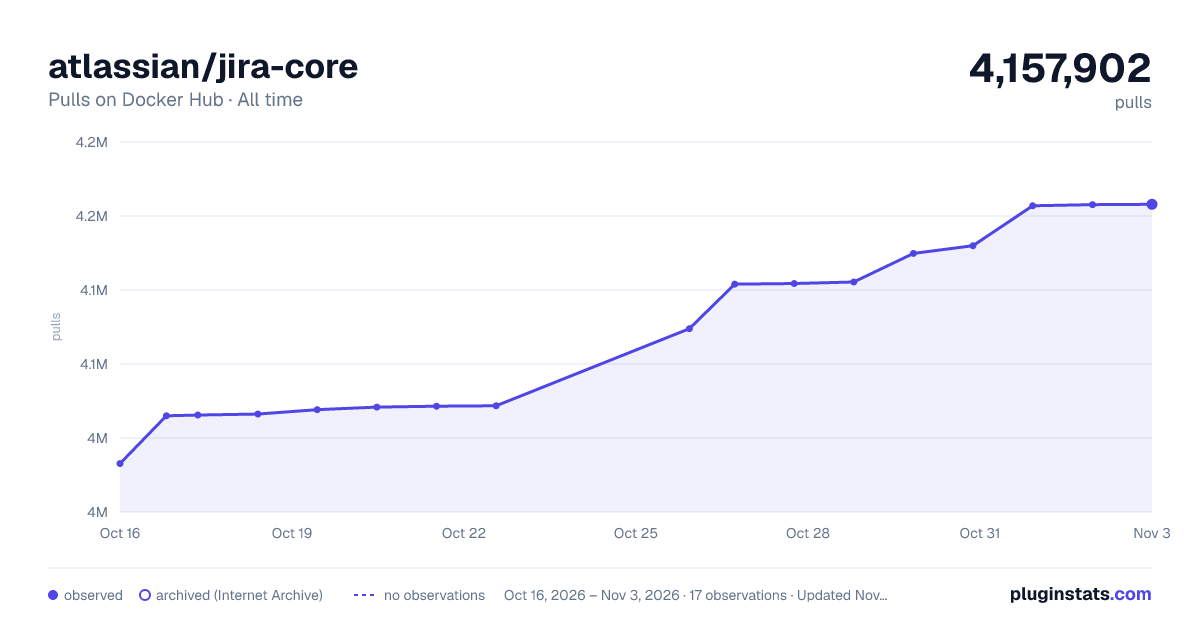

Adoption over time
7/30/90-day growth
Ranking history
Listing placement
Filled points are observed values; hollow points come from Internet Archive snapshots of the listing page. Dashed segments span periods with no observations — values between points are not interpolated.
Each band is one page of 20. Pulls on a linear scale. Placement is projected from pulls, so it can differ from the marketplace's own sort order. Hover a dot to see the listing.
Recent observations
Full history (4)Similar Docker Hub plugins
All 20 atlassian/jira-core alternativesData source
Cumulative pull counts and stars come from the public Docker Hub API. Pulls count image downloads (including automated CI pulls), not installs or users.
Listing: https://hub.docker.com/r/atlassian/jira-core. First seen Oct 16, 2026; last successful collection Oct 19, 2026. See the methodology.