 PluginStats
backdrop pulls statistics
Docker Hub · Content management system
The comprehensive CMS for small to medium sized businesses and non-profits.
backdrop has 7,993,360 recorded pulls on Docker Hub.
It ranks #149 of 1,263 tracked Docker Hub listings by pulls.
PluginStats has 3 daily observations since Oct 16, 2026; the latest is from Oct 18, 2026.
About backdrop
Quick reference
• Maintained by: Backdrop Ops • Where to get help: the Docker Community Slack, Server Fault, Unix & Linux, or Stack Overflow
Supported tags and respective Dockerfile links
• 1.34.2, 1.34, 1, 1.34.2-apache, 1.34-apache, 1-apache, apache, latest • 1.34.2-fpm, 1.34-fpm, 1-fpm, fpm
Quick reference (cont.)
• Where to file issues: https://github.com/backdrop-ops/backdrop-docker/issues • Supported architectures: (more info) amd64, arm64v8 • Published image artifact details: repo-info repo's repos/backdrop/ directory (history) (image metadata, transfer size, etc) • Image updates: official-images repo's library/backdrop label official-images repo's library/backdrop file (history) • Source of this description: docs repo's backdrop/ directory (history)
What is Backdrop CMS?
Backdrop CMS is a comprehensive Content Management System for small to medium sized businesses and non-profits. It is a fork of the Drupal project.
Backdrop CMS enables people to build highly customized websites, affordably, through collaboration and open source software. For more on the Backdrop's philosophy see https://backdropcms.org/philosophy.
How to use this image
The basic pattern for starting a backdrop instance is:
The following environment variables are also honored for configuring your Backdrop CMS instance:
• -e BACKDROP_DB_HOST=... (defaults to the IP and port of the linked mysql container) • -e BACKDROP_DB_USER=... (defaults to "root") • -e BACKDROP_DB_PASSWORD=... (defaults to the value of the MYSQL_ROOT_PASSWORD environment variable from the linked mysql container) • -e BACKDROP_DB_NAME=... (defaults to "backdrop") • -e BACKDROP_DB_PORT=... (defaults to 3306) • -e BACKDROP_DB_DRIVER=... (defaults to "mysql")
The BACKDROP_DB_NAME must already exist on the given MySQL server. Check out the official mysql image for more info on spinning up a DB.
If you'd like to be able to access the instance from the host without the container's IP, standard port mappings can be used:
Then, access it via http://localhost:8080 or http://host-ip:8080 in a browser.
If you'd like to use an external database instead of a linked mysql container, specify the hostname and port with BACKDROP_DB_HOST/BACKDROP_DB_PORT along with the password in BACKDROP_DB_PASSWORD and the username in BACKDROP_DB_USER (if it is something other than root):
... via docker compose
Example compose.yaml for backdrop:
Run docker compose up, wait for it to initialize completely, and visit http://localhost:8080 or http://host-ip:8080.
Adding additional libraries / extensions
This image does not provide any additional PHP extensions or other libraries, even if they are required by popular plugins. There are an infinite number of possible plugins, and they potentially require any extension PHP supports. Including every PHP extension that exists would dramatically increase the image size.
If you need additional PHP extensions, you'll need to create your own image FROM this one. The documentation of the php image explains how to compile additional extensions. Additionally, the drupal:7 Dockerfile has an example of doing this.
The following Docker Hub features can help with the task of keeping your dependent images up-to-date:
• Automated Builds let Docker Hub automatically build your Dockerfile each time you push changes to it.
License
View license information for the software contained in this image.
As with all Docker images, these likely also contain other software which may be under other licenses (such as Bash, etc from the base distribution, along with any direct or indirect dependencies of the primary software being contained).
Some additional license information which was able to be auto-detected might be found in the repo-info repository's backdrop/ directory.
As for any pre-built image usage, it is the image user's responsibility to ensure that any use of this image complies with any relevant licenses for all software contained within.
Description from the Docker Hub listing.
Where backdrop sits in the listing
Each band is one page of 20. Pulls on a log scale. Placement is projected from pulls, so it can differ from the marketplace's own sort order. Hover a dot to see the listing.


Charts
Images: 30d · 1y · all time · 1600×900 dark


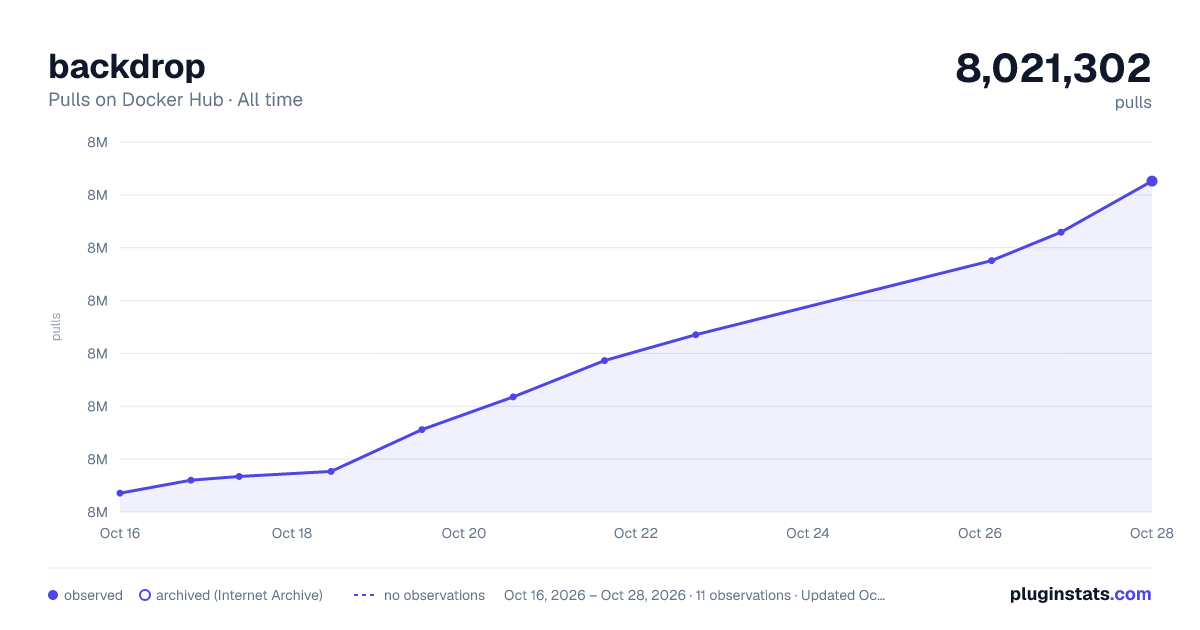

Adoption over time


7/30/90-day growth


Filled points are observed values; hollow points come from Internet Archive snapshots of the listing page. Dashed segments span periods with no observations — values between points are not interpolated.
Recent observations
Full history (3)Similar Docker Hub Content management system plugins
Data source
Cumulative pull counts and stars come from the public Docker Hub API. Pulls count image downloads (including automated CI pulls), not installs or users.
Listing: https://hub.docker.com/_/backdrop. First seen Oct 16, 2026; last successful collection Oct 18, 2026. See the methodology.