 PluginStats
linuxserver/ci pulls statistics
By linuxserver (100 listings) · Docker Hub · Integration & delivery
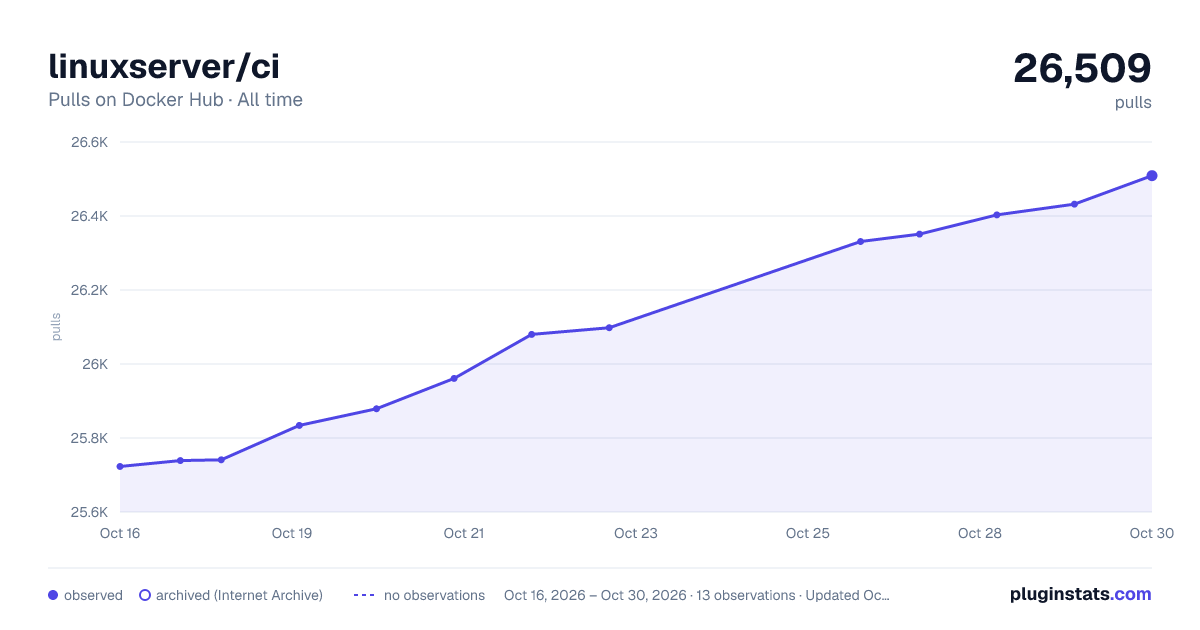
linuxserver/ci has 25,961 recorded pulls on Docker Hub, ranking #648 of 1,265 tracked listings.
About linuxserver/ci

Contact information:-
| Type | Address/Details |
|---|---|
| Discord | Discord |
| Forum | Linuserver.io forum |
linuxserver/ci
What is this?
This container is an automated testing tool for Docker images. It's designed to perform a series of checks to ensure a container is healthy and functional before it's released. Here's what it does:
- Spins up the container: It runs the target Docker image with a specified tag.
- Checks for successful startup: It tails the container's logs, waiting for the
[services.d] done.message, which confirms the init system has finished and the services are running. - Generates an SBOM: It uses
syftto create a Software Bill of Materials, providing a complete list of all packages inside the image. - Tests the Web UI (optional): If the container runs a web service, it attempts to connect to the UI and take a screenshot to verify it's accessible and renders correctly.
- Generates a report: It gathers all the results—container logs, build info, SBOM, screenshots, and test statuses—into a comprehensive HTML report.
- Uploads the report (CI only): In a CI environment, it uploads the final report to an S3 bucket for review.
Developer Mode (Local Testing)
For local development and debugging, you can use CI_LOCAL_MODE. This mode runs all the tests but skips the S3 upload, saving the report directly to a local folder. It's the easiest way to test a container without needing cloud credentials.
Example Run Command
Run this command from your terminal. It will test the linuxserver/plex:latest image and place the report in an output directory in your current folder.
docker run --rm -i \
 --shm-size=1gb \
 -v /var/run/docker.sock:/var/run/docker.sock \
 -v "$(pwd)/output:/ci/output" \
 -e CI_LOCAL_MODE=true \
 -e IMAGE="linuxserver/plex" \
 -e TAGS="latest" \
 -e BASE="ubuntu" \
 -e WEB_SCREENSHOT=true \
 -e PORT=32400 \
 -e SSL=false \
 -e WEB_PATH="/web/index.html" \
 -e WEB_AUTH="" \
 -e WEB_SCREENSHOT_TIMEOUT=60 \
 -e WEB_SCREENSHOT_DELAY=20 \
 -t lsiodev/ci:latest \
 python3 test_build.py
Viewing the Report
Once the script finishes, you can view the detailed HTML report with this command:
chromium output/linuxserver/plex/latest/index.html
Note: You can use any modern web browser (Firefox, Chrome, etc.).
Key Local Variables
| Variable | Description | Example |
|---|---|---|
CI_LOCAL_MODE | Required. Enables local mode, disables S3 uploads. | true |
IMAGE | Required. The full name of the image to test. | linuxserver/plex |
TAGS | Required. The tag(s) to test. Use | to separate multiple tags. | latest |
BASE | Required. The base distribution of the image. | ubuntu or alpine |
WEB_SCREENSHOT | Set to true to enable screenshot testing for web UIs. | true |
PORT | The internal port the web UI listens on. | 32400 |
SSL | Set to true if the web UI uses https://. | false |
WEB_PATH | The specific path to the web UI landing page. | /web/index.html |
WEB_AUTH | Credentials for basic auth, format user:password. Leave empty for none. | "" |
WEB_SCREENSHOT_DELAY | Seconds to wait after the page loads before taking the screenshot. | 20 |
Advanced Usage (CI Environment)
This container is not meant for public consumption as it is hard coded to LinuxServer endpoints for storage of resulting reports.
The following shows the full list of environment variables used when the container is run by our CI system, linuxserver/pipeline-triggers.…
Description from the Docker Hub listing.
README badge
Show your rank in a README or on your website. The badge updates automatically.
Charts
Images: 30d · 1y · all time · 1600×900 dark



Adoption over time
7/30/90-day growth
Ranking history
Listing placement
Listing placement
Listing placement
Filled points are observed values; hollow points come from Internet Archive snapshots of the listing page. Dashed segments span periods with no observations — values between points are not interpolated.
Each band is one page of 20. Pulls on a linear scale. Placement is projected from pulls, so it can differ from the marketplace's own sort order. Hover a dot to see the listing.
Recent observations
Full history (6)Similar Docker Hub Integration & delivery plugins
All 20 linuxserver/ci alternativesData source
Cumulative pull counts and stars come from the public Docker Hub API. Pulls count image downloads (including automated CI pulls), not installs or users.
Listing: https://hub.docker.com/r/linuxserver/ci. First seen Oct 16, 2026; last successful collection Oct 21, 2026. See the methodology.