 PluginStats
nuxeo has 5,513,238 recorded pulls on Docker Hub.
It ranks #170 of 1,263 tracked Docker Hub listings by pulls.
PluginStats has 3 daily observations since Oct 16, 2026; the latest is from Oct 18, 2026.
About nuxeo
DEPRECATION NOTICE
This image is deprecated, as the Nuxeo-maintained images are now private (docker-library/official-images#6127 (comment)). For further support, contact Nuxeo.
Quick reference
• Maintained by: Nuxeo • Where to get help: the Docker Community Forums, the Docker Community Slack, or Stack Overflow
Supported tags and respective Dockerfile links
• 7.10, 7, LTS-2015 • 8.10, 8, LTS-2016 • 9.10, 9, LTS-2017 • 10.10, 10, LTS-2019, LTS, FT, latest
Quick reference (cont.)
• Where to file issues: https://github.com/nuxeo/docker-nuxeo/issues • Supported architectures: (more info) amd64 • Published image artifact details: repo-info repo's repos/nuxeo/ directory (history) (image metadata, transfer size, etc) • Image updates: official-images repo's library/nuxeo label official-images repo's library/nuxeo file (history) • Source of this description: docs repo's nuxeo/ directory (history)
What is Nuxeo ?
The Nuxeo Platform is a highly customizable and extensible content management platform for building business applications.
How to use this image
Start a bare nuxeo instance
This image includes EXPOSE 8080 (the nuxeo port). The default Nuxeo configuration is applied which feature an embedded database (H2), and an embedded Elasticsearch instance. This setup is not suitable for production. See below to know how to setup a production ready container by specifying environment variables.
The Nuxeo platform is accesible at http://${DOCKER_HOST}:8080/ and default User and Password are Administrator/Administrator.
Start a nuxeo with some additional packages
This will install the same image as above but comes with some demo Nuxeo packages to demonstrate its various usage (DAM, DM, search etc...)
You can find additional informations on how to use this image in Nuxeo documentation
Environment Variables
The Nuxeo image uses several environment variable that allow to specify a more specific setup.
NUXEO_DB_TYPE
This defines the database type to use. By default it sets an H2 embedded database that is suitable for test purpose only. When specifying a DB type, other variable mays help :
• NUXEO_DB_HOST : If NUXEO_DB_TYPE is defined, this variable is mandatory and has to point to the DB server host. • NUXEO_DB_NAME : name of the database to use (nuxeo by default) • NUXEO_DB_USER : user to connect to the database (nuxeo by default) • NUXEO_DB_PASSWORD : the password to connect to the database (nuxeo by default)
NUXEO_TEMPLATES
This variables allows to add additional Nuxeo configuration templates in the nuxeo.templates configuration variable.
NUXEO_ES_HOSTS
This variables allows to setup an external Elasticsearch cluster. Use a comma separated list of Elasticsearch hosts with the 9300 port. Additional environment vars may be setup like :
• NUXEO_ES_CLUSTER_NAME : name of the Elasticsearch cluster to join • NUXEO_ES_INDEX_NAME: name of the index (nuxeo by default) • NUXEO_ES_REPLICAS : number or replicas (1 by default). If not 0, it means that your ES cluster must have enough node to fullfill the replicas setup. • NUXEO_ES_SHARDS : number or shards (5 by default).
For instance :
NUXEO_ES_HOSTS=es1:9300,es2:9300 NUXEO_ES_CLUSTER_NAME=dockerCluster NUXEO_ES_INDEX_NAME=nuxeo1 NUXEO_ES_REPLICAS=0 NUXEO_ES_SHARDS=5
NUXEO_REDIS_HOST
In order to use Redis, just set up this variable to the Redis host address.
NUXEO_REDIS_PORT
If Redis is setup, you can ovewrite the default port configuration (default to 6379)
NUXEO_CLID
Allow to setup a CLID for Nuxeo Connect registration. This parameter is in the form part1\npart2, so depending on the environment you may have to escape the \ character.
You can find additional informations the registration process in the Nuxeo documentation
NUXEO_INSTALL_HOTFIX
This launch the install of latest Hotfixes. (true by default, but needs a NUXEO_CLID to be setup)
NUXEO_PACKAGES
Allows to install Nuxeo packages at startup.
NUXEO_URL
This variable sets the URL where your Nuxeo instance will be joinable. It's used for instance to refer to it when sending server's address in mails.
NUXEO_DATA
Location of the Nuxeo data directory. (/var/lib/nuxeo/data by default). You will likely customize NUXEO_DATA to map it on docker volume so data like binaries stay persistent.
NUXEO_LOG
Location of the Nuxeo log directory. (/var/log/nuxeo by default)
NUXEO_AUTOMATION_TRACE
If set to "true", this will enable the automation trace mode.
NUXEO_DEV_MODE
If set to "true", this will enable the development mode that will allow hot reload when developing with Nuxeo Studio.
NUXEO_BINARY_STORE
Tells the location of the binary store which configure the binary storage
NUXEO_TRANSIENT_STORE
Tells the location of the transient storage
NUXEO_DDL_MODE
Allows to setup Database creation option by fixing the ddlMode value.
NUXEO_CUSTOM_PARAM
Allows to add custom parameters to nuxeo.conf. Multiple parameters can be splitted by a \n. For instance:
NUXEO_CUSTOM_PARAM="repository.clustering.enabled=false\nrepository.clustering.delay=1000"
How to extend this image
Adding additional configuration
If you would like to do additional setup in an image derived from this one, you can add a /docker-entrypoint-initnuxeo.d/nuxeo.conf file that will be appended to the end of the regular nuxeo.conf file.
If you need a root account to run some installation steps in your Dockerfile, then you need to put those steps between two USER command as the image is run with the user 1000 (nuxeo). For instance:
Launching custom shell scripts
You can add your own shell scripts in a special /docker-entrypoint-initnuxeo.d directory. When ending in .sh, they will be run on default entrypoint startup.
ffmpeg
As it contains some non-free Codecs, we dont't ship a binary version of ffmpeg as part of this image. However, you can simply add the compilation in a derived images by adding these lines to your Dockerfile.
Using Oracle JVM…
Description from the Docker Hub listing.
Where nuxeo sits in the listing
Each band is one page of 20. Pulls on a log scale. Placement is projected from pulls, so it can differ from the marketplace's own sort order. Hover a dot to see the listing.


Charts
Images: 30d · 1y · all time · 1600×900 dark


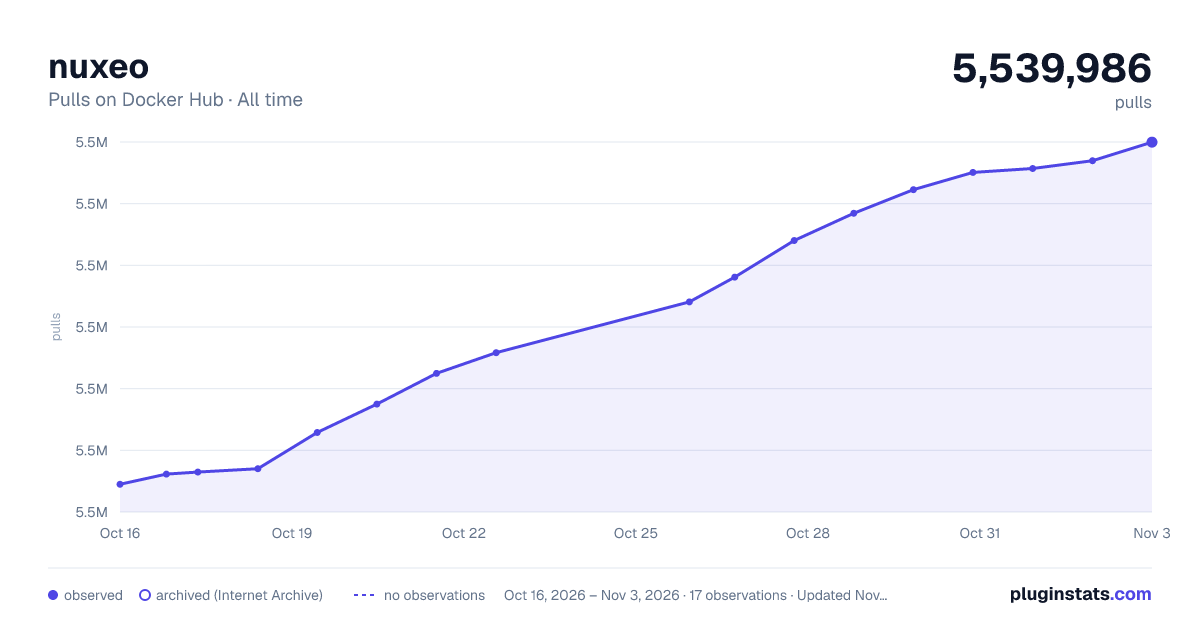

Adoption over time


7/30/90-day growth


Filled points are observed values; hollow points come from Internet Archive snapshots of the listing page. Dashed segments span periods with no observations — values between points are not interpolated.
Recent observations
Full history (3)Similar Docker Hub plugins
Data source
Cumulative pull counts and stars come from the public Docker Hub API. Pulls count image downloads (including automated CI pulls), not installs or users.
Listing: https://hub.docker.com/_/nuxeo. First seen Oct 16, 2026; last successful collection Oct 18, 2026. See the methodology.