 PluginStats
hashicorp/vault-enterprise-fips pulls statistics
By hashicorp (104 listings) · Docker Hub · Databases & storage
Official Vault Enterprise - FIPS docker images
hashicorp/vault-enterprise-fips has 326,569 recorded pulls on Docker Hub, ranking #316 of 1,265 tracked listings.
About hashicorp/vault-enterprise-fips
Vault Enterprise FIPS
This HashiCorp enterprise software is for use only by customers who have a valid and active license agreement with HashiCorp or an authorized HashiCorp reseller. If you do not have a valid license to use this software, you may not download or otherwise use it. All use of this software is subject to the terms and conditions of your license agreement, and all other rights are expressly reserved.
Agreement
The following shall apply unless your organization has a separately signed agreement governing your use of the software made available here:
The software is subject to the license terms or community license (i.e. Mozilla Public License 2.0 or Business Source License), as applicable, located in the download package for the software, the IBM International Program License Agreement, the IBM International License Agreement for Evaluation of Programs (for evaluation uses), or the IBM International License Agreement for Early Release of Programs (alpha and beta releases), and the applicable License Information, copies of which are also available at https://www.ibm.com/terms. In the event of a conflict between the license file in the download package and the noted IBM licenses above, the relevant IBM terms will apply. Please refer to the license terms prior to using the software. Your installation and use of the software constitute your acceptance of those terms. If you do not accept the terms, do not use the software.
Vault
Vault is a tool for securely accessing secrets. A secret is anything that you want to tightly control access to, such as API keys, passwords, certificates, and more. Vault provides a unified interface to any secret, while providing tight access control and recording a detailed audit log. For more information, please see:
Using the Container
We chose Alpine as a lightweight base with a reasonably small surface area for security concerns, but with enough functionality for development and interactive debugging.
Vault always runs under dumb-init, which handles reaping zombie processes and forwards signals on to all processes running in the container. This binary is built by HashiCorp and signed with our GPG key, so you can verify the signed package used to build a given base image.
Running the Vault container with no arguments will give you a Vault server in development mode. The provided entry point script will also look for Vault subcommands and run vault with that subcommand. For example, you can execute docker run vault status and it will run the vault status command inside the container. The entry point also adds some special configuration options as detailed in the sections below when running the server subcommand. Any other command gets exec-ed inside the container under dumb-init.
The container exposes two optional VOLUMEs:
/vault/logs, to use for writing persistent audit logs. By default nothing is written here; thefileaudit backend must be enabled with a path under this directory./vault/file, to use for writing persistent storage data when using thefiledata storage plugin. By default nothing is written here (adevserver uses an in-memory data store); thefiledata storage backend must be enabled in Vault's configuration before the container is started.
The container has a Vault configuration directory set up at /vault/config and the server will load any HCL or JSON configuration files placed here by binding a volume or by composing a new image and adding files. Alternatively, configuration can be added by passing the configuration JSON via environment variable VAULT_LOCAL_CONFIG.
Memory Locking and 'setcap'
The container will attempt to lock memory to prevent sensitive values from being swapped to disk and as a result must have --cap-add=IPC_LOCK provided to docker run. Since the Vault binary runs as a non-root user, setcap is used to give the binary the ability to lock memory. With some Docker storage plugins in some distributions this call will not work correctly; it seems to fail most often with AUFS. The memory locking behavior can be disabled by setting the SKIP_SETCAP environment variable to any non-empty value.
Running Vault for Development
$ docker run --cap-add=IPC_LOCK -d --name=dev-vault hashicorp/vault
This runs a completely in-memory Vault server, which is useful for development but should not be used in production.
When running in development mode, two additional options can be set via environment variables:
VAULT_DEV_ROOT_TOKEN_ID: This sets the ID of the initial generated root token to the given valueVAULT_DEV_LISTEN_ADDRESS: This sets the IP:port of the development server listener (defaults to 0.0.0.0:8200)
As an example:
$ docker run --cap-add=IPC_LOCK -e 'VAULT_DEV_ROOT_TOKEN_ID=myroot' -e 'VAULT_DEV_LISTEN_ADDRESS=0.0.0.0:1234' hashicorp/vault
Running Vault in Server Mode for Development
$ docker run --cap-add=IPC_LOCK -e 'VAULT_LOCAL_CONFIG={"storage": {"file": {"path": "/vault/file"}}, "listener": [{"tcp": { "address": "0.0.0.0:8200", "tls_disable": true}}], "default_lease_ttl": "168h", "max_lease_ttl": "720h", "ui": true}' -p 8200:8200 hashicorp/vault server
This runs a Vault server with TLS disabled, the file storage backend at path /vault/file and a default secret lease duration of one week and a maximum of 30 days. Disabling TLS and using the file storage backend are not recommended for production use.…
Description from the Docker Hub listing.
README badge
Show your rank in a README or on your website. The badge updates automatically.
Charts
Images: 30d · 1y · all time · 1600×900 dark


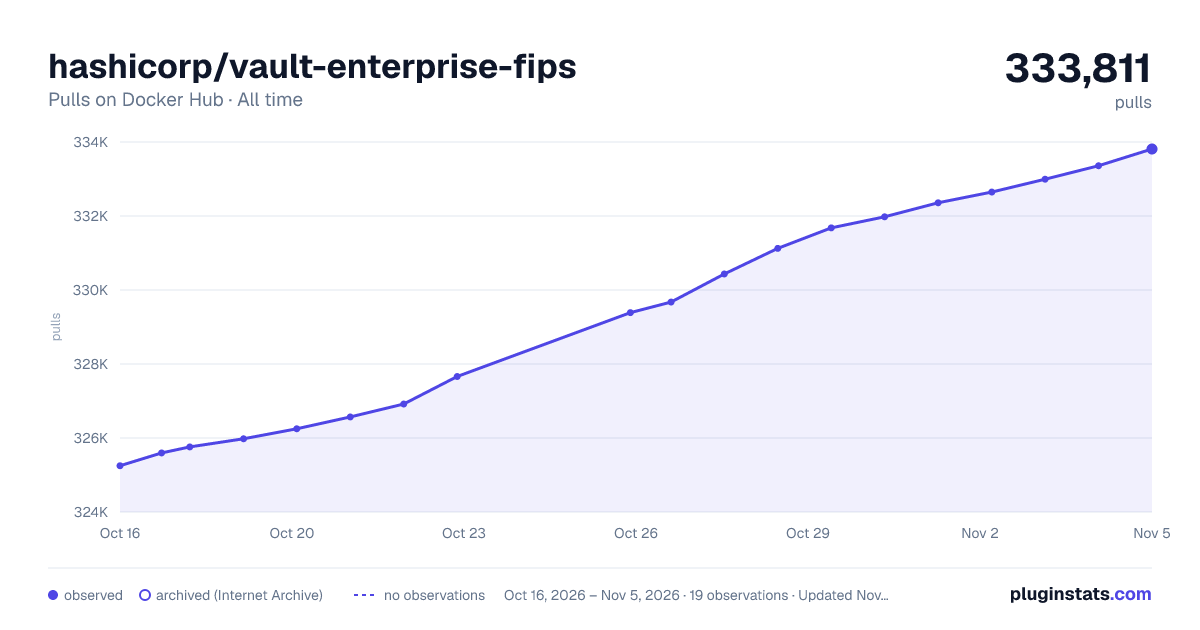

Adoption over time
7/30/90-day growth
Ranking history
Listing placement
Listing placement
Listing placement
Listing placement
Filled points are observed values; hollow points come from Internet Archive snapshots of the listing page. Dashed segments span periods with no observations — values between points are not interpolated.
Each band is one page of 20. Pulls on a linear scale. Placement is projected from pulls, so it can differ from the marketplace's own sort order. Hover a dot to see the listing.
Recent observations
Full history (6)Similar Docker Hub Databases & storage plugins
All 20 hashicorp/vault-enterprise-fips alternativesData source
Cumulative pull counts and stars come from the public Docker Hub API. Pulls count image downloads (including automated CI pulls), not installs or users.
Listing: https://hub.docker.com/r/hashicorp/vault-enterprise-fips. First seen Oct 16, 2026; last successful collection Oct 21, 2026. See the methodology.