 PluginStats
jetbrains/teamcity-agent pulls statistics
By jetbrains (640 listings) · Docker Hub · Integration & delivery
TeamCity Build Agent
jetbrains/teamcity-agent has 23,809,701 recorded pulls on Docker Hub, ranking #93 of 1,265 tracked listings.
About jetbrains/teamcity-agent
TeamCity Build Agent

This is an official JetBrains TeamCity build agent image.
<img src="https://raw.githubusercontent.com/JetBrains/teamcity-docker-images/master/docs/media/GitHub.png" height="20" align="center"/> More details about tags and components are here .
The TeamCity build agent connects to the TeamCity server and spawns the actual build processes.
You can use the jetbrains/teamcity-server image to run a TeamCity server. To learn how you can start the TeamCity server together with agents in one go, see these Docker Compose samples.
This image adds a TeamCity agent suitable for Java development. It is based on jetbrains/teamcity-minimal-agent but gives you more benefits, e.g.
- client-side checkout if you use 'git' or 'mercurial'
- more bundled build tools
- 'docker-in-docker' on Linux
How to Use This Image
Pull the TeamCity image from the Docker Hub Repository:
jetbrains/teamcity-agent
and use the following command to start a container with TeamCity agent running inside
a Linux container:
docker run -e SERVER_URL="<url to TeamCity server>"  \
    -v <path to agent config folder>:/data/teamcity_agent/conf  \
    jetbrains/teamcity-agent
or a Windows container:
docker run -e SERVER_URL="<url to TeamCity server>"
    -v <path to agent config folder>:C:/BuildAgent/conf
    jetbrains/teamcity-agent
where <url to TeamCity server> is the full URL for TeamCity server, accessible by the agent. Note that "localhost" will not generally not work as it will refer to the "localhost" inside the container.
<path to agent config folder> is the host machine directory to serve as the TeamCity agent config directory. We recommend providing this binding in order to persist the agent configuration, e.g. authorization on the server. Note that you should map a different folder for every new agent you create.
Since version 2020.1, TeamCity agent Docker images run under a non-root user. Refer to our upgrade notes for information on possible affected use cases.
When you run the agent for the first time, you should authorize it via the TeamCity server UI: go to the Unauthorized Agents page in your browser. See more details. All information about agent authorization is stored in the agent's configuration folder. If you stop the container with the agent and then start a new one with the same config folder, the agent's name and authorization state will be preserved.
A TeamCity agent does not need manual upgrade: it will upgrade itself automatically on connecting to a server.
Agent Image Environment Variables
SERVER_URL– URL of the TeamCity server agent will connect toAGENT_NAME– (optional) Name of the agent in TeamCity UI, autogenerated if omittedAGENT_TOKEN– (optional) Agent authorization token, if unset, the agent should be authorized via TeamCity UI.OWN_ADDRESS– (optional, Linux-only) IP address build agent binds to, autodetectedOWN_PORT– (optional, Linux-only) Port build agent binds to, 9090 by defaultDOCKER_IN_DOCKER– (optional, Linux-only) Run Docker within Docker.
Preserving Checkout Directories Between Builds
When build agent container is restarted, it re-checkouts sources for the builds.
To avoid this, you should pass a couple of additional options to preserve build agent state between restarts:
- Preserve checked out sources (
-v /opt/buildagent/work:/opt/buildagent/work) - Keep internal build agent caches (
-v /opt/buildagent/system:/opt/buildagent/system)
You can use other than /opt/buildagent/ source path prefix on the host machine unless you're going to use Docker Wrapper via docker.sock (see below).
Running Builds Which Require Docker
You have two options if you need a docker daemon available inside your builds.
One is to use docker server from the host, which starts teamcity agent container (docker-out-of-docker). Another is to run a docker server inside teamcity agent container (docker-in-docker).
NOTE: both of these options require extra trust to your builds, as a build may get root access to the host where the TeamCity agent container is running. Read more about Docker security at OWASP and review the TeamCity security notes.
Using the docker from the host
This is the approach of passing docker socket into the started agent, with the -v /var/run/docker.sock:/var/run/docker.sock volume parameter.
In this case you will benefit from the docker caches shared between the host and all your containers but there is a security concern: your build might actually harm your host Docker, so use it at your own risk
docker run -e SERVER_URL="<url to TeamCity server>"  \
    -u 0 \
    -v <path to agent config folder>:/data/teamcity_agent/conf \
    -v /var/run/docker.sock:/var/run/docker.sock  \
    -v /opt/buildagent/work:/opt/buildagent/work \
    -v /opt/buildagent/temp:/opt/buildagent/temp \
    -v /opt/buildagent/tools:/opt/buildagent/tools \
    -v /opt/buildagent/plugins:/opt/buildagent/plugins \
    -v /opt/buildagent/system:/opt/buildagent/system \
    jetbrains/teamcity-agent
```…
Description from the Docker Hub listing.
README badge
Show your rank in a README or on your website. The badge updates automatically.
Charts
Images: 30d · 1y · all time · 1600×900 dark


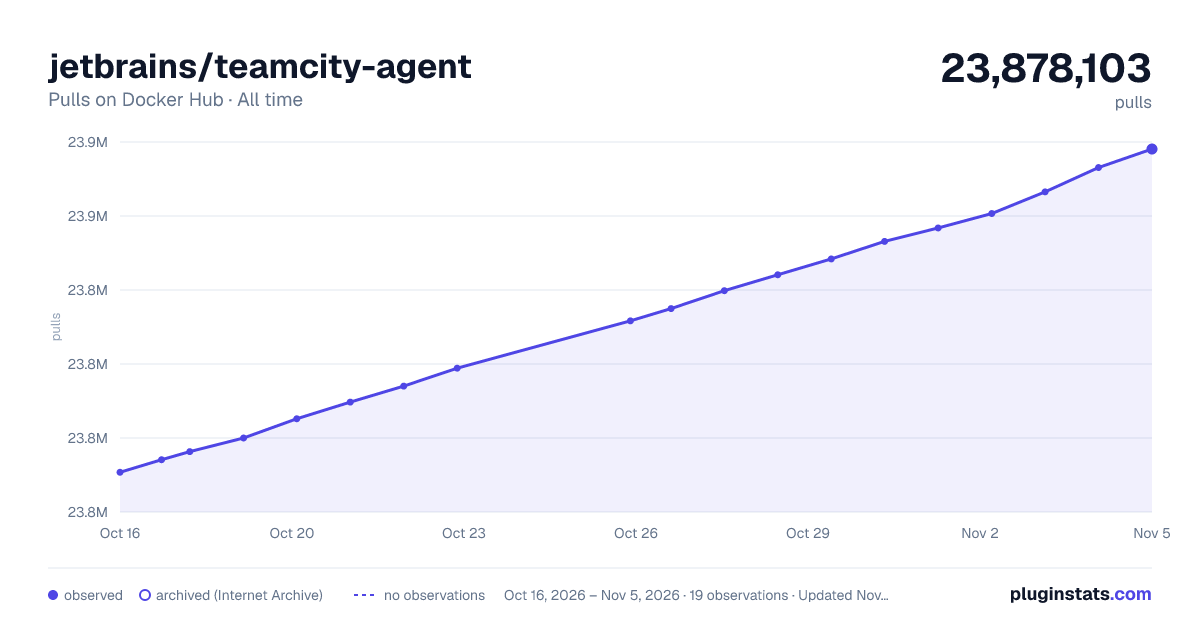

Adoption over time
7/30/90-day growth
Ranking history
Listing placement
Listing placement
Filled points are observed values; hollow points come from Internet Archive snapshots of the listing page. Dashed segments span periods with no observations — values between points are not interpolated.
Each band is one page of 20. Pulls on a linear scale. Placement is projected from pulls, so it can differ from the marketplace's own sort order. Hover a dot to see the listing.
Recent observations
Full history (6)Similar Docker Hub Integration & delivery plugins
All 20 jetbrains/teamcity-agent alternativesData source
Cumulative pull counts and stars come from the public Docker Hub API. Pulls count image downloads (including automated CI pulls), not installs or users.
Listing: https://hub.docker.com/r/jetbrains/teamcity-agent. First seen Oct 16, 2026; last successful collection Oct 21, 2026. See the methodology.