 PluginStats
convertigo pulls statistics
Docker Hub · Languages & frameworks
Enterprise-grade full-stack open-source AI-driven Low Code & No Code platform for web & mobile apps
convertigo has 6,109,418 recorded pulls on Docker Hub, ranking #165 of 1,265 tracked listings.
About convertigo
Note: the description for this image is longer than the Hub length limit of 25000, so has been trimmed. The full description can be found at https://github.com/docker-library/docs/tree/master/convertigo/README.md. See also docker/hub-feedback#238 and docker/roadmap#475.
Quick reference
-
Maintained by:
Convertigo -
Where to get help:
the Docker Community Slack, Server Fault, Unix & Linux, or Stack Overflow
Supported tags and respective Dockerfile links
Quick reference (cont.)
-
Where to file issues:
https://github.com/convertigo/docker/issues -
Published image artifact details:
repo-info repo'srepos/convertigo/directory (history)
(image metadata, transfer size, etc) -
Image updates:
official-images repo'slibrary/convertigolabel
official-images repo'slibrary/convertigofile (history) -
Source of this description:
docs repo'sconvertigo/directory (history)
What is Convertigo Low Code Platform ?
Convertigo is an open source fullstack AI driven Low Code & No Code platform. The platform is used to build Enterprise Web & Mobile apps in a few days. Convertigo platform is composed of several components:
- Convertigo Server: The back-end server part. Handles back-end connectors, micro-services execution, offline data device synchronization and serves Web & Mobile Web apps. Runs as a Docker container with the
convertigoimage - Convertigo Studio: Runs on a Windows or a MacOS workstation, Eclipse based IDE, used to program Back-end micro-services workflows and use the "Mobile Builder" edition to build Mobile & Web apps UIs with AI assistance Low code mode. Can be directly downloaded from Convertigo
- Convertigo NoCode Studio: The No Code App Builder to build form based apps as PWAs or Web applications with a Web Based NoCode studio intented for non technical developpers (Citizen Developpers)
Convertigo Community edition brought to you by Convertigo SA. The platform is currently used by more than 150K developers worldwide, building enterprise class business apps.
How to use this image
Quick start
$ docker run --name C8O -d -p 28080:28080 convertigo
This will start a container running the minimum Convertigo server. Convertigo uses images' /workspace directory to store configuration file and deployed projects as an Docker volume.
You can access the Server admin console on http://[dockerhost]:28080/convertigo and login using the default credentials: admin / admin.
The Server can also be accessed by HTTPS on https://[dockerhost]:28443/convertigo if SSL is configured (see the HTTPS section below).
Production deployment
Before exposing the server to end users, change the default administration credentials and review the Production deployment recommendations in the Operating Guide. The guide covers HTTPS termination and HSTS at the reverse proxy or load balancer, restrictions on administration and optional API discovery, explicit CORS origins (PUBLIC_DOMAINS), error-response details, product-version disclosure and project files protected with .httpignore (8.4.4+). These are settings to choose for your deployment, not changes to the image defaults.
Connect Convertigo to a CouchDB database for FullSync (Convertigo EE only)
Convertigo FullSync uses Apache CouchDB 3.5 as its NoSQL repository.
For modern Docker setups, prefer one of these approaches:
- another container on the same Docker network
- a service running directly on the Docker host
CouchDB running on the Docker host
With Docker Desktop, host.docker.internal is available by default:
$ docker run -d --name C8O \
    -e JAVA_OPTS="-Dconvertigo.engine.fullsync.couch.url=http://host.docker.internal:5984" \
    -p 28080:28080 convertigo
On Docker Engine for Linux, add:
--add-host host.docker.internal:host-gateway
Example:
$ docker run -d --name C8O \
    --add-host host.docker.internal:host-gateway \
    -e JAVA_OPTS="-Dconvertigo.engine.fullsync.couch.url=http://host.docker.internal:5984" \
    -p 28080:28080 convertigo
```…
Description from the Docker Hub listing.
README badge
Show your rank in a README or on your website. The badge updates automatically.
Charts
Images: 30d · 1y · all time · 1600×900 dark


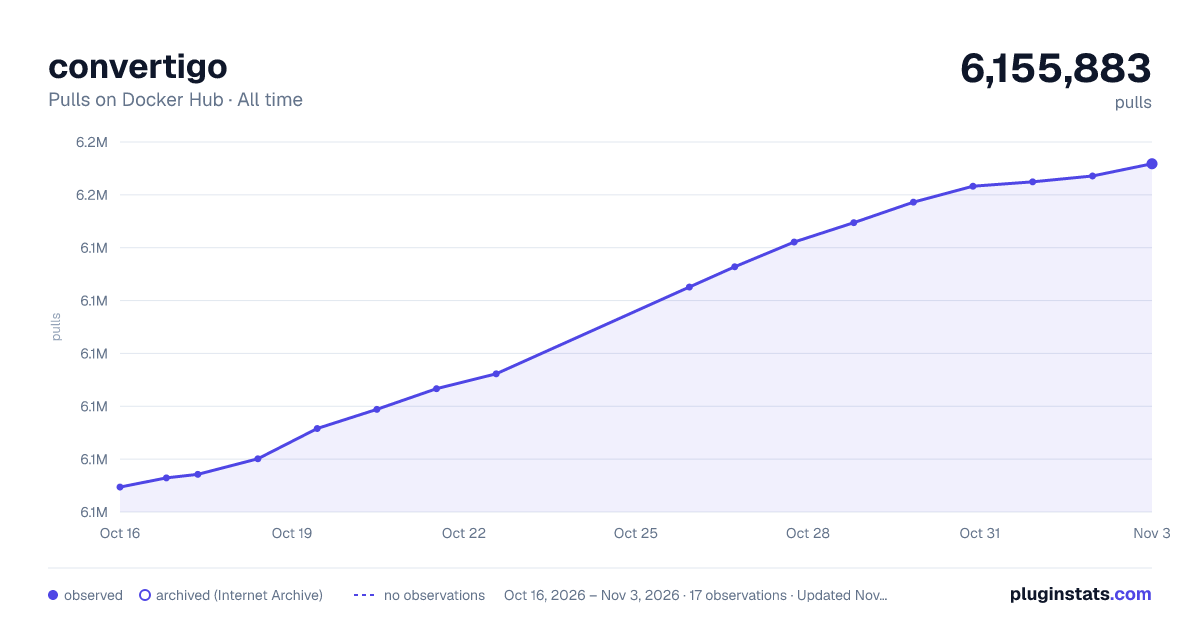

Adoption over time
7/30/90-day growth
Ranking history
Listing placement
Listing placement
Filled points are observed values; hollow points come from Internet Archive snapshots of the listing page. Dashed segments span periods with no observations — values between points are not interpolated.
Each band is one page of 20. Pulls on a linear scale. Placement is projected from pulls, so it can differ from the marketplace's own sort order. Hover a dot to see the listing.
Recent observations
Full history (6)Similar Docker Hub Languages & frameworks plugins
All 20 convertigo alternativesData source
Cumulative pull counts and stars come from the public Docker Hub API. Pulls count image downloads (including automated CI pulls), not installs or users.
Listing: https://hub.docker.com/_/convertigo. First seen Oct 16, 2026; last successful collection Oct 21, 2026. See the methodology.