 PluginStats
krakend pulls statistics
KrakenD is a stateless, high-performance, enterprise-ready, open source API gateway written in Go.
krakend has 771,703 recorded pulls on Docker Hub, ranking #276 of 1,265 tracked listings.
About krakend
Quick reference
-
Maintained by:
the KrakenD Maintainers -
Where to get help:
documentation, community support, open an issue, other support channels
Supported tags and respective Dockerfile links
Quick reference (cont.)
-
Where to file issues:
https://github.com/krakend/krakend-ce/issues -
Published image artifact details:
repo-info repo'srepos/krakend/directory (history)
(image metadata, transfer size, etc) -
Image updates:
official-images repo'slibrary/krakendlabel
official-images repo'slibrary/krakendfile (history) -
Source of this description:
docs repo'skrakend/directory (history)

What is KrakenD?
KrakenD is a stateless, high-performance, enterprise-ready, open-source API gateway written in Go. Its engine (formerly known as KrakenD Framework) is now a Linux Foundation Project codenamed Lura Project. Lura is the only enterprise-grade API Gateway hosted in a neutral, open forum.
KrakenD is lightweight and straightforward, as it only requires writing the configuration file. No Go knowledge is required. It offers connectivity to internal and external services, data transformation and filtering, and aggregation of multiple data sources (APIs, gRPC, queues and pub/sub, lambda, etc.) simultaneously or in cascade. It protects access to your API, throughputs its usage, and integrates with many third-parties.
All features are designed to offer extraordinary performance and infinite scalability.
How to use this image
KrakenD only needs a single configuration file to create an API Gateway, although you can have a complex setup reflecting your organization structure. The configuration file(s) can live anywhere in the container, but the default location (the workdir) is /etc/krakend.
To use the image, COPY your krakend.json file inside the container or mount it using a volume. The configuration is checked only once during the startup and never used again. Don't have a config file yet? Generate it with the KrakenD Designer UI.
⚠️ NOTICE: KrakenD does not use live reload when your configuration changes. Restart the container.
Quick start
You can start an empty gateway with a health check with the following commands:
docker run -d -p 8080:8080 -v "$PWD:/etc/krakend/" krakend

curl http://localhost:8080/__health
{"agents":{},"now":"2024-05-23 14:35:55.552591448 +0000 UTC m=+26.856583003","status":"ok"}
More Examples
The following are several examples of running KrakenD. By default, the command run is executed, but you can pass other commands and flags at the end of the run command.
The configuration files are taken from the current directory ($PWD). Therefore, all examples expect to find at least the file krakend.json.
Run with the debug enabled (flag -d):
This flag is SAFE to use in production. It's meant to enable KrakenD as a fake backend itself by enabling a /__debug endpoint
docker run -p 8080:8080 -v "${PWD}:/etc/krakend/" krakend run -d -c /etc/krakend/krakend.json
Checking the syntax of your configuration file
See the check command
docker run -it -v $PWD:/etc/krakend/ krakend check --config krakend.json
Show the help:
docker run --rm -it krakend help
Building your custom KrakenD image
Most production deployments will not want to rely on mounting a volume for the container but to use their image based on krakend:
Your Dockerfile could look like this:
FROM krakend:<version>
# NOTE: Avoid using :latest image on production. Stick to a major version instead.

COPY krakend.json ./

# Check and test that the file is valid
RUN krakend check -t --lint-no-network -c krakend.json
If you want to manage your KrakenD configuration using multiple files and folders, reusing templates, and distributing the configuration amongst your teams, you can use the flexible configuration (FC). The following Dockerfile combines FC, the krakend check command, and a 2-step build.
FROM krakend:<version> as builder

COPY krakend.tmpl .
COPY config .…
Description from the Docker Hub listing.
README badge
Show your rank in a README or on your website. The badge updates automatically.
Charts
Images: 30d · 1y · all time · 1600×900 dark


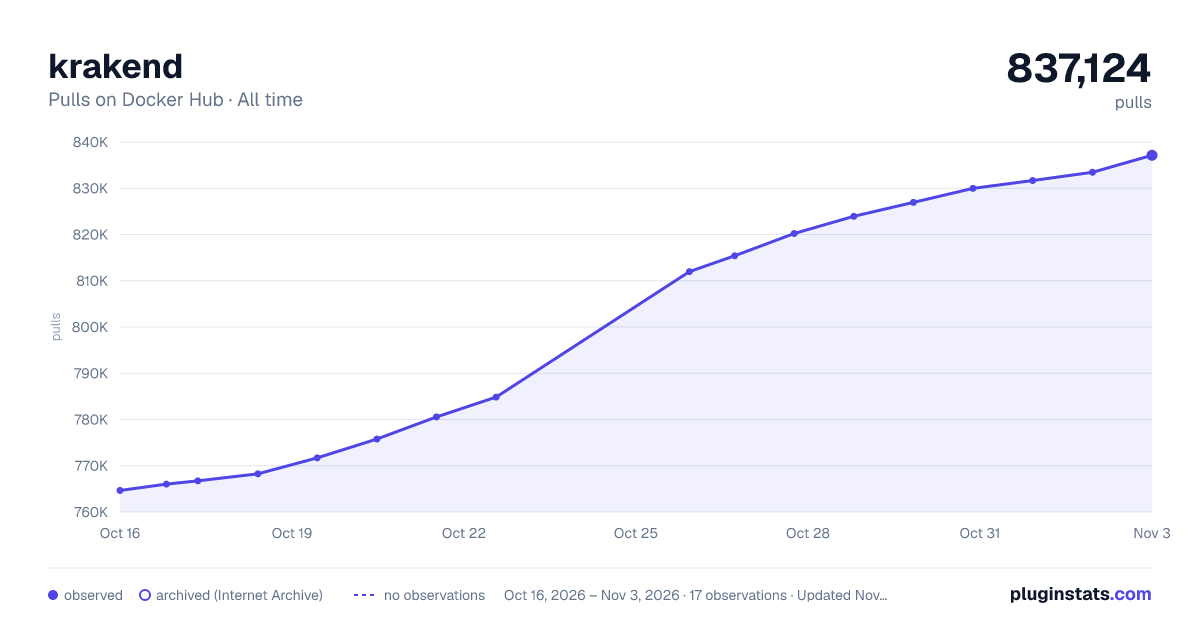

Adoption over time
7/30/90-day growth
Ranking history
Listing placement
Listing placement
Filled points are observed values; hollow points come from Internet Archive snapshots of the listing page. Dashed segments span periods with no observations — values between points are not interpolated.
Each band is one page of 20. Pulls on a linear scale. Placement is projected from pulls, so it can differ from the marketplace's own sort order. Hover a dot to see the listing.
Recent observations
Full history (5)Similar Docker Hub API management plugins
All 20 krakend alternativesData source
Cumulative pull counts and stars come from the public Docker Hub API. Pulls count image downloads (including automated CI pulls), not installs or users.
Listing: https://hub.docker.com/_/krakend. First seen Oct 16, 2026; last successful collection Oct 20, 2026. See the methodology.