 PluginStats
atlassian/bitbucket-pipelines-importer pulls statistics
By atlassian (66 listings) · Docker Hub
atlassian/bitbucket-pipelines-importer has 23,381 recorded pulls on Docker Hub, ranking #662 of 1,265 tracked listings.
About atlassian/bitbucket-pipelines-importer
Bitbucket Pipelines Importer




Bitbucket Pipelines Importer helps automate your migration to Bitbucket Pipelines from another CI platform. Currently it supports Jenkins and Bamboo(Beta).
Getting Started
Bitbucket Pipelines Importer is distributed as a Docker image. You can also compile and run it as a Java application. This allows you to extend the tool to map additional CI plugins to Bitbucket Pipelines features.
Using Docker
Prerequisites
The Docker CLI must be installed and running.
Usage
(Optional) Pull the latest Docker image:
This step is only required if you have pulled or run the Docker image before and want to ensure you have the latest version.
docker pull atlassian/bitbucket-pipelines-importer
Print the help message:
docker run -it --rm atlassian/bitbucket-pipelines-importer --help
To migrate a CI configuration to Bitbucket Pipelines:
-
Export a variable for the mount path in the Docker container:
export MOUNT_PATH=/files -
Run the Docker container:
Jenkins:
docker run -it --rm \
  -e MOUNT_PATH=$MOUNT_PATH \
  -v $PWD/workDir:$MOUNT_PATH \
  atlassian/bitbucket-pipelines-importer migrate jenkins \
  -i "${MOUNT_PATH}/Jenkinsfile" \
  -o "${MOUNT_PATH}/bitbucket-pipelines.yml"
Bamboo:
docker run -it --rm \
  -e MOUNT_PATH=$MOUNT_PATH \
  -v $PWD/workDir:$MOUNT_PATH \
  atlassian/bitbucket-pipelines-importer migrate bamboo \
  -i "${MOUNT_PATH}/bamboo_file.yml" \
  -o "${MOUNT_PATH}/bitbucket-pipelines.yml"
Building from Source
Prerequisites
- Java 21 or later
- Maven
Usage
-
Build the JAR file:
mvn package spring-boot:repackage -
Run the JAR file:
Jenkins:
java -jar target/bitbucket-pipelines-importer-<version>.jar \
  migrate jenkins \
  -i Jenkinsfile \
  -o bitbucket-pipelines.yml
Bamboo:
java -jar target/bitbucket-pipelines-importer-<version>.jar \
  migrate bamboo \
  -i bamboo_file.yml \
  -o bitbucket-pipelines.yml
Alternatively, you can build and run the Docker image locally:
-
Build the Docker image:
docker build -t bitbucket-pipelines-importer . -
Run the Docker container:
docker run -it --rm bitbucket-pipelines-importer --help
Migrate Command (Bamboo)
The migrate command converts Bamboo plans into a Bitbucket Pipelines
bitbucket-pipelines.yml configuration file.
Parameters
| Parameter | Required | Repeatable | Description |
|---|---|---|---|
--bamboo-instance-url | Yes | No | Base URL of your Bamboo instance (e.g. https://bamboo.example.com). |
--bamboo-access-token | Yes | No | Bearer token used to authenticate against the Bamboo REST API. |
--output-dir | Yes | No | Directory where the migrated pipeline YAML file(s) will be written. |
--project-key | No | Yes | Bamboo project key(s) to migrate. Mutually exclusive with --plan-key. |
--plan-key | No | Yes | Bamboo plan key(s) to migrate (format: PROJECT_KEY-PLAN_KEY, e.g. PROJ1-PLAN1). Mutually exclusive with --project-key. |
-i / --input | No | No | Path to a local Bamboo YAML spec file to migrate (file-based mode). Mutually exclusive with Bamboo connectivity options. |
-o / --output | No | No | Path for the output bitbucket-pipelines.yml file (file-based mode). |
Note: If neither
--project-keynor--plan-keyis provided (and-iis not used), the migration will run against all plans in the Bamboo instance (instance-level migration).
Output
Instance-level migration
When migrating an entire instance, files are written under:
<output-dir>/
  <bamboo-hostname>/
    <timestamp>/
      build/
        <PROJECT_KEY>/
          <PLAN_KEY>/
            pipelines.yml       ← the generated Bitbucket Pipelines configuration
            bamboo_plan.yml     ← the original Bamboo plan YAML spec
      deployments/
        <DEPLOYMENT_PROJECT_ID>/
          pipelines.yml       ← generated deployment-compatible config (when applicable)
          bamboo_plan.yml     ← source deployment plan/details (when applicable)
Examples
Migrate an entire Bamboo instance:…
Description from the Docker Hub listing.
README badge
Show your rank in a README or on your website. The badge updates automatically.
Charts
Images: 30d · 1y · all time · 1600×900 dark


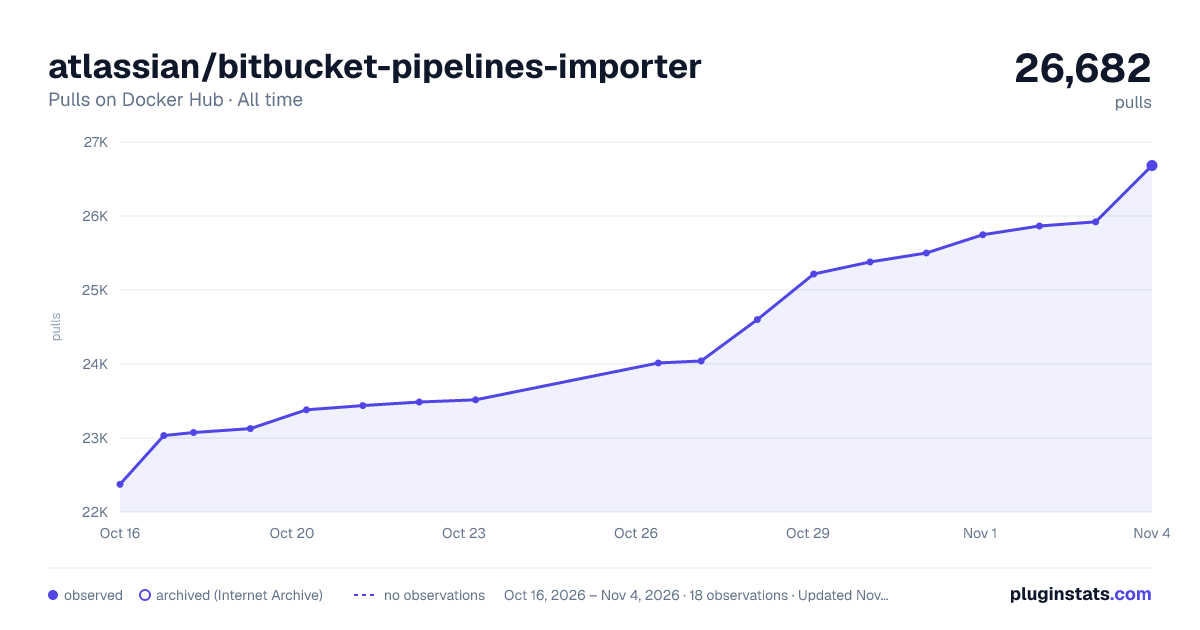

Adoption over time
7/30/90-day growth
Ranking history
Listing placement
Filled points are observed values; hollow points come from Internet Archive snapshots of the listing page. Dashed segments span periods with no observations — values between points are not interpolated.
Each band is one page of 20. Pulls on a linear scale. Placement is projected from pulls, so it can differ from the marketplace's own sort order. Hover a dot to see the listing.
Recent observations
Full history (5)Similar Docker Hub plugins
All 20 atlassian/bitbucket-pipelines-importer alternativesData source
Cumulative pull counts and stars come from the public Docker Hub API. Pulls count image downloads (including automated CI pulls), not installs or users.
Listing: https://hub.docker.com/r/atlassian/bitbucket-pipelines-importer. First seen Oct 16, 2026; last successful collection Oct 20, 2026. See the methodology.