 PluginStats
mcp/nova-canvas-mcp-server pulls statistics
By mcp (100 listings) · Docker Hub · Machine learning & AI
AI image generation using Amazon Nova Canvas.
mcp/nova-canvas-mcp-server has 11,197 recorded pulls on Docker Hub, ranking #892 of 1,265 tracked listings.
About mcp/nova-canvas-mcp-server
AWS Labs Nova Canvas MCP Server
AI image generation using Amazon Nova Canvas.
MCP Info
| Attribute | Details |
|---|---|
| Docker Image | mcp/nova-canvas-mcp-server |
| Author | awslabs |
| Repository | https://github.com/awslabs/mcp |
Image Building Info
| Attribute | Details |
|---|---|
| Dockerfile | https://github.com/awslabs/mcp/blob/76ec6993aec4c6281e5250cbeba8db6a5863f2ff/src/nova-canvas-mcp-server/Dockerfile |
| Docker Image built by | Docker Inc. |
| Docker Scout Health Score | |
| Verify Signature | COSIGN_REPOSITORY=mcp/signatures cosign verify mcp/nova-canvas-mcp-server --key https://raw.githubusercontent.com/docker/keyring/refs/heads/main/public/mcp/latest.pub |
| Licence | Apache License 2.0 |
Available Tools (2)
| Tools provided by this Server | Short Description |
|---|---|
generate_image | Generate an image using Amazon Nova Canvas with text prompt. |
generate_image_with_colors | Generate an image using Amazon Nova Canvas with color guidance. |
Tools Details
Tool: generate_image
Generate an image using Amazon Nova Canvas with text prompt.
This tool uses Amazon Nova Canvas to generate images based on a text prompt. The generated image will be saved to a file and the path will be returned.
IMPORTANT FOR ASSISTANT: Always send the current workspace directory when calling this tool! The workspace_dir parameter should be set to the directory where the user is currently working so that images are saved to a location accessible to the user.
Prompt Best Practices
An effective prompt often includes short descriptions of:
- The subject
- The environment
- (optional) The position or pose of the subject
- (optional) Lighting description
- (optional) Camera position/framing
- (optional) The visual style or medium ("photo", "illustration", "painting", etc.)
Do not use negation words like "no", "not", "without" in your prompt. Instead, use the negative_prompt parameter to specify what you don't want in the image.
You should always include "people, anatomy, hands, low quality, low resolution, low detail" in your negative_prompt
Example Prompts
- "realistic editorial photo of female teacher standing at a blackboard with a warm smile"
- "whimsical and ethereal soft-shaded story illustration: A woman in a large hat stands at the ship's railing looking out across the ocean"
- "drone view of a dark river winding through a stark Iceland landscape, cinematic quality"
Returns: McpImageGenerationResponse: A response containing the generated image paths.
| Parameters | Type | Description |
|---|---|---|
prompt | string | The text description of the image to generate (1-1024 characters) |
cfg_scale | number optional | How strongly the image adheres to the prompt (1.1-10.0) |
filename | string optional | The name of the file to save the image to (without extension) |
height | integer optional | The height of the generated image (320-4096, divisible by 16) |
negative_prompt | string optional | Text to define what not to include in the image (1-1024 characters) |
number_of_images | integer optional | The number of images to generate (1-5) |
quality | string optional | The quality of the generated image ("standard" or "premium") |
seed | string optional | Seed for generation (0-858,993,459) |
width | integer optional | The width of the generated image (320-4096, divisible by 16) |
workspace_dir | string optional | The current workspace directory where the image should be saved. |
CRITICAL: Assistant must always provide the current IDE workspace directory parameter to save images to the user's current project.
Tool: generate_image_with_colors
Generate an image using Amazon Nova Canvas with color guidance.
This tool uses Amazon Nova Canvas to generate images based on a text prompt and color palette. The generated image will be saved to a file and the path will be returned.
IMPORTANT FOR Assistant: Always send the current workspace directory when calling this tool! The workspace_dir parameter should be set to the directory where the user is currently working so that images are saved to a location accessible to the user.
Prompt Best Practices
An effective prompt often includes short descriptions of:
- The subject
- The environment
- (optional) The position or pose of the subject
- (optional) Lighting description
- (optional) Camera position/framing
- (optional) The visual style or medium ("photo", "illustration", "painting", etc.)
Do not use negation words like "no", "not", "without" in your prompt. Instead, use the negative_prompt parameter to specify what you don't want in the image.
Example Colors
- ["#FF5733", "#33FF57", "#3357FF"] - A vibrant color scheme with red, green, and blue
- ["#000000", "#FFFFFF"] - A high contrast black and white scheme
- ["#FFD700", "#B87333"] - A gold and bronze color scheme…
Description from the Docker Hub listing.
README badge
Show your rank in a README or on your website. The badge updates automatically.
Charts
Images: 30d · 1y · all time · 1600×900 dark


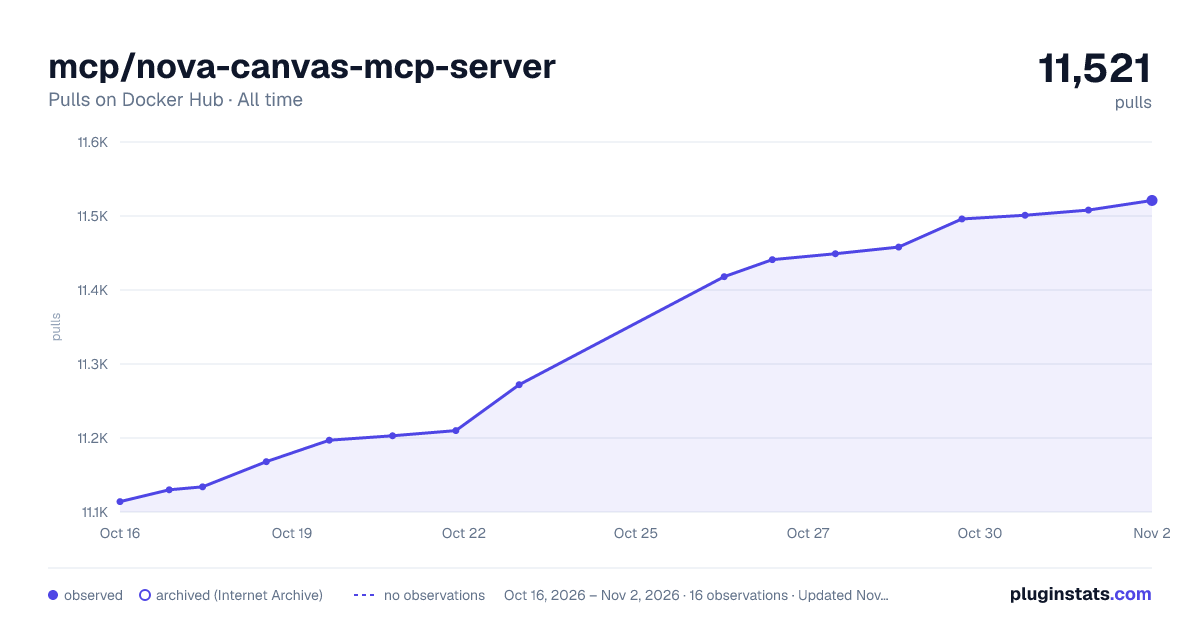

Adoption over time
7/30/90-day growth
Ranking history
Listing placement
Listing placement
Filled points are observed values; hollow points come from Internet Archive snapshots of the listing page. Dashed segments span periods with no observations — values between points are not interpolated.
Each band is one page of 20. Pulls on a linear scale. Placement is projected from pulls, so it can differ from the marketplace's own sort order. Hover a dot to see the listing.
Recent observations
Full history (5)Similar Docker Hub Machine learning & AI plugins
All 20 mcp/nova-canvas-mcp-server alternativesData source
Cumulative pull counts and stars come from the public Docker Hub API. Pulls count image downloads (including automated CI pulls), not installs or users.
Listing: https://hub.docker.com/r/mcp/nova-canvas-mcp-server. First seen Oct 16, 2026; last successful collection Oct 20, 2026. See the methodology.