 PluginStats
jenkins/pct pulls statistics
By jenkins (33 listings) · Docker Hub · Languages & frameworks
Plugin Compat Tester - no longer published as a docker image
jenkins/pct has 320,746 recorded pulls on Docker Hub, ranking #317 of 1,265 tracked listings.
About jenkins/pct
Plugin Compatibility Tester (PCT)
This is no longer published as a Docker image and is only kept for historical reasons

Generates a compatibility matrix for plugins against Jenkins core.
Running PCT
Running PCT in Docker
It is recommended to run PCT in the prepared Docker image. You can find it here.
Examples
This command will clone of a repository and run PCT against the latest Jenkins Core:
docker run -ti --rm -v maven-repo:/root/.m2 -v $(pwd)/out:/pct/out -e ARTIFACT_ID=ssh-slaves -e VERSION=ssh-slaves-1.24 jenkins/pct
This command will run PCT for the latest plugin version against the specified Jenkins WAR. PCT supports running against SNAPSHOT builds, but PCT will have to install local Maven artifacts in such case.
docker run -ti --rm -v maven-repo:/root/.m2 -v $(pwd)/out:/pct/out -v my/jenkins.war:/pct/jenkins.war:ro -e ARTIFACT_ID=ssh-slaves jenkins/pct
This command will run PCT against custom versions of Jenkins and the plugin specified by volumes.
docker run -ti --rm -v maven-repo:/root/.m2 -v $(pwd)/out:/pct/out -v my/jenkins.war:/pct/jenkins.war:ro -v my/plugin:/pct/plugin-src:ro jenkins/pct
The command below will run PCT for a branch in a custom repository.
docker run --rm -v maven-repo:/root/.m2 -v $(pwd)/out:/pct/out -e CHECKOUT_SRC=https://github.com/oleg-nenashev/job-restrictions-plugin.git -e VERSION=JENKINS-26374 jenkins/pct
Full PCT runs using a war file as input with Docker
The PCT cli supports to pass a war file containing plugins (generated with Custom war Packager for example) as input, in this case the version of the plugins is infered from the war file contents.
In such scenarios is tipical to want to run the PCT for all plugins contained in the war file, to avoid having to spawn a new docker container for each plugin
you can use the env variables DO_NOT_OVERRIDE_PCT_CHECKOUT=true to let the PCT CLI (instead of the run-pct script) checkout the proper
versions of the plugins and make sure the PCT does not stop before testing all plugins.
By using those env variables you can pass a comma separated list of plugins ids using the ARTIFACT_ID env variable
docker run -ti --rm -v maven-repo:/root/.m2 -v $(pwd)/out:/pct/out -v my/jenkins.war:/pct/jenkins.war:ro -e ARTIFACT_ID=ssh-slaves,credentials -e DO_NOT_OVERRIDE_PCT_CHECKOUT=true -e jenkins/pct
Configuration
Environment variables:
ARTIFACT_ID- ID of the artifact to be tested. The image will be able to determine this ID automatically ifCHECKOUT_SRCor/pct/plugin-srcare defined.VERSION- tag/commit/branch to be checked out and tested.masterby defaultCHECKOUT_SRC- Custom Git clone source (e.g.https://github.com/oleg-nenashev/job-restrictions-plugin.git).https://github.com/jenkinsci/${ARTIFACT_ID}-plugin.gitby defaultJAVA_OPTS- Java options to be passed to the PCT CLIDEBUG- Boolean flag, which enables the Remote Debug mode (port == 5000)M2_SETTINGS_FILE- If set indicates the path of the custom maven settings file to use (see volumes below)INSTALL_BUNDLED_SNAPSHOTS- Install JAR and plugin snapshots to local repository.trueby default.SKIP_LOCAL_SNAPSHOT_INSTALLATION- If exists WAR snapshots (core and plugins) will not be installed, if not present war snapshots will be installed
Volumes:
/pct/plugin-src- Plugin sources to be used for the PCT run. Sources will be checked out if not specified/pct/jenkins.war- Jenkins WAR file to be used for the PCT run/pct/m2-settings.xml- Custom Maven Settings (optional) ifM2_SETTINGS_FILEenvironment variable existsrun-pctwill ignore this location and use the one specified in the variable/pct/out- Output directory for PCT. All reports will be stored there/pct/tmp- Temporary directory. Can be exposed to analyze run failures/root/.m2- Maven repository. It can be used to pass settings.xml or to cache artifacts
:exclamation: Note that the entrypoint script of the PCT docker image tries to checkout the plugin sources before invoking the PCT if no war is provided. That means for plugins relying on PreCheckoutHooks (like multimodule ones) the standard docker run will fail to get sources as the PreCheckoutHooks are not run by the docker image entrypoint script. In that case possible workarounds are:
- Using a war file
- Download the sources of the plugin and use the
/pct/plugin-srcvolume to inform the PCT about them - Use the docker image but override the entry point and run manually the PCT inside the image
- Run the PCT manually as explained below
Running PCT manually
PCT offers the CLI interface which can be used to run PCT locally.
- Download
PCTand executemvn clean install - Download plugin sources to a
PLUGIN_SRCdirectory. - Checkout the plugin repo to a tag/commit/branch you want to test
- Run
mvn clean install -DskipTeststo initialize artifacts - Go to
PCTfolder and run the CLI (make sure to modify paths according to your system). Example:
java -jar target/plugins-compat-tester-cli.jar \
  --working-dir $(pwd)/tmp/work \
  --include-plugins ${PLUGIN_ARTIFACT_ID} \
  --war jenkins.war --local-checkout-dir ${PLUGIN_SRC} \
  --mvn ${PATH_TO_MAVEN}
You can run the CLI with the -help argument to get a full list of supported options.
:exclamation: For the moment testing more than one plugin at once requires plugins to be released, so for testing SNAPSHOTS you need to execute the last step for every plugin you want to test*
Running PCT with custom Java versions
You can run the example by running the following command:…
Description from the Docker Hub listing.
README badge
Show your rank in a README or on your website. The badge updates automatically.
Charts
Images: 30d · 1y · all time · 1600×900 dark


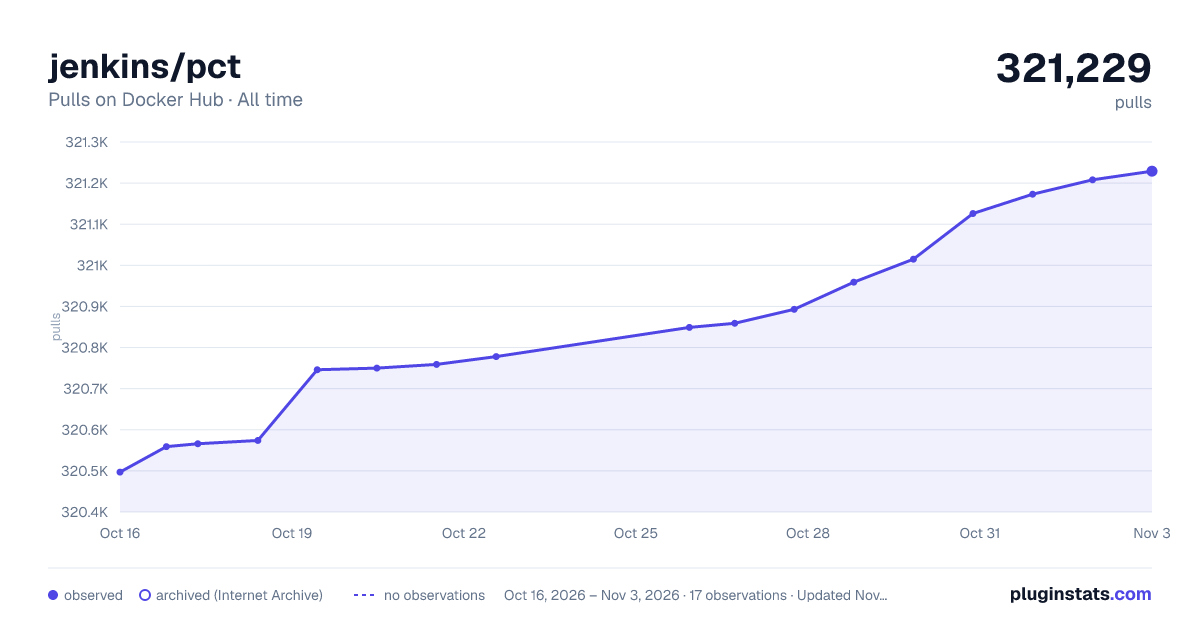

Adoption over time
7/30/90-day growth
Ranking history
Listing placement
Listing placement
Listing placement
Listing placement
Filled points are observed values; hollow points come from Internet Archive snapshots of the listing page. Dashed segments span periods with no observations — values between points are not interpolated.
Each band is one page of 20. Pulls on a linear scale. Placement is projected from pulls, so it can differ from the marketplace's own sort order. Hover a dot to see the listing.
Recent observations
Full history (5)Similar Docker Hub Languages & frameworks plugins
All 20 jenkins/pct alternativesData source
Cumulative pull counts and stars come from the public Docker Hub API. Pulls count image downloads (including automated CI pulls), not installs or users.
Listing: https://hub.docker.com/r/jenkins/pct. First seen Oct 16, 2026; last successful collection Oct 20, 2026. See the methodology.