 PluginStats
silverpeas pulls statistics
Docker Hub · Content management system
Silverpeas is a turnkey and open-source Collaborative and Social-Networking Portal.
silverpeas has 2,509,096 recorded pulls on Docker Hub, ranking #211 of 1,265 tracked listings.
About silverpeas
Quick reference
-
Maintained by:
Silverpeas -
Where to get help:
the Silverpeas user mailing list
Supported tags and respective Dockerfile links
Quick reference (cont.)
-
Where to file issues:
https://github.com/Silverpeas/docker-silverpeas-prod/issues -
Published image artifact details:
repo-info repo'srepos/silverpeas/directory (history)
(image metadata, transfer size, etc) -
Image updates:
official-images repo'slibrary/silverpeaslabel
official-images repo'slibrary/silverpeasfile (history) -
Source of this description:
docs repo'ssilverpeas/directory (history)
What is Silverpeas
Silverpeas is a Collaborative and Social-Networking Portal built to facilitate and to leverage the collaboration, the knowledge-sharing and the feedback of persons, teams and organizations.
Accessible from a simple web browser or from a smartphone, Silverpeas is used every days by ourselves. With about 30 ready-to-use applications and with its conversional and relational functions, it makes possible for users to work together, share their knowledge and good practices, and in general to improve their reciprocal empathy, therefore their willingness to collaborate.
Silverpeas is usually used as an intranet and extranet platform dedicated to collaboration and information sharing.

How to use this image
Docker images of Silverpeas require one of the following database system in order to be used:
- the open-source, powerful and recommended PostgreSQL database system,
- the Microsoft SQLServer database system,
- the Oracle database system.
The Silverpeas images support actually only the two first database systems; because of the non-free licensing issues with the Oracle JDBC drivers, Silverpeas cannot include these drivers by default and consequently it cannot use transparently an Oracle database system as a persistence backend.
For the same reasons, the Docker images of Silverpeas aren't shipped with the Oracle JVM but with OpenJDK. Silverpeas uses the Wildfly application server as runtime.
The Silverpeas images use the following environment variables to set the database access parameters:
DB_SERVERTYPEto specify the database system to use with Silverpeas: POSTGRESQL for PostgreSQL, MSSQL for Microsoft SQLServer, ORACLE for Oracle. By default, it is set to POSTGRESQL.DB_SERVERto specify the IP address or the name of the host on which the database system is running. By default, it is set todatabase, so that any container running a database can be linked to the Silverpeas container with this name.DB_NAMEto specify the database to use with Silverpeas. By default, it is set toSilverpeas.DB_USERto specify the user identifier to use by Silverpeas to access the database. By default, it is set tosilverpeas(it is recommended to dedicate a user account in the database for each application).DB_PASSWORDto specify the password associated with the user identifier above.
These environment variables can be also defined as properties into the Silverpeas global configuration file config.properties (see below).
Start a Silverpeas instance with a database from a Docker container
In Docker Hub, no Docker images of Microsoft SQLServer are currently available, but you will find a lot of images of PostgreSQL. For example, with an official PostgreSQL docker image, you can start a PostgreSQL instance initialized with a superuser postgres with as password mysecretpassword:
$ docker run --name postgresql -d \
    -e POSTGRES_PASSWORD="mysecretpassword" \
    -v postgresql-data:/var/lib/postgresql/data \
    postgres:12.3
We recommend strongly to mount the directory with the database file on the host so the data won't be lost when upgrading PostgreSQL to a newer version (a Data Volume Container can be used instead). For any information how to start a PostgreSQL container, you can refer its documentation.
Once the database system is running, a database for Silverpeas has to be created and a user with administrative rights on this database (and only on this database) should be added; it is recommended for a security reason to create a dedicated user account in the database for each application and therefore for Silverpeas. In this document, and by default, a database Silverpeas and a user silverpeas for that database are created. For example:…
Description from the Docker Hub listing.
README badge
Show your rank in a README or on your website. The badge updates automatically.
Charts
Images: 30d · 1y · all time · 1600×900 dark


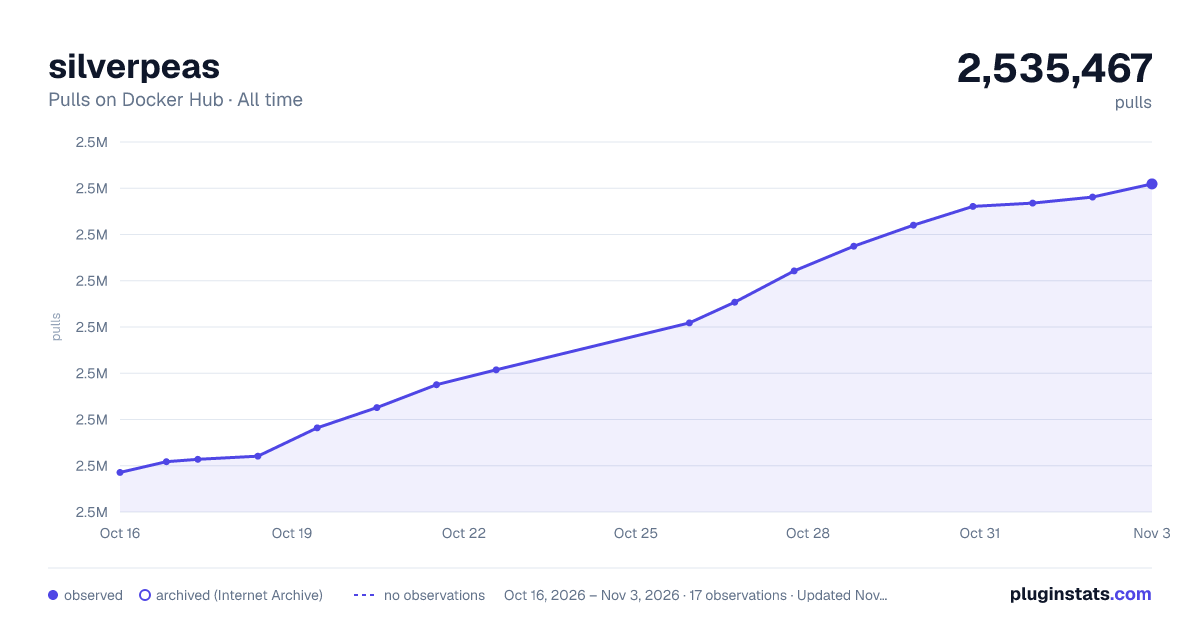

Adoption over time
7/30/90-day growth
Ranking history
Listing placement
Listing placement
Filled points are observed values; hollow points come from Internet Archive snapshots of the listing page. Dashed segments span periods with no observations — values between points are not interpolated.
Each band is one page of 20. Pulls on a linear scale. Placement is projected from pulls, so it can differ from the marketplace's own sort order. Hover a dot to see the listing.
Recent observations
Full history (5)Similar Docker Hub Content management system plugins
All 20 silverpeas alternativesData source
Cumulative pull counts and stars come from the public Docker Hub API. Pulls count image downloads (including automated CI pulls), not installs or users.
Listing: https://hub.docker.com/_/silverpeas. First seen Oct 16, 2026; last successful collection Oct 20, 2026. See the methodology.