 PluginStats
hashicorp/consul-terraform-sync-enterprise pulls statistics
By hashicorp (104 listings) · Docker Hub · Integration & delivery
hashicorp/consul-terraform-sync-enterprise has 45,879 recorded pulls on Docker Hub, ranking #533 of 1,265 tracked listings.
About hashicorp/consul-terraform-sync-enterprise
Consul-Terraform-Sync Enterprise
Consul-Terraform-Sync (CTS) extends Consul to automating your network infrastructure with Terraform. CTS monitors changes to the L7 network layer and uses Terraform to dynamically update your infrastructure. You can customize automation to suit your team's infrastructure needs by defining the resources to change with Terraform modules.
- Documentation: consul.io/docs/nia
- GitHub: github.com/hashicorp/consul-terraform-sync
- Community portal: discuss.hashicorp.com
Notice for (x.y.z-ent) Image Variants
This HashiCorp enterprise software is for use only by customers who have a valid and active license agreement with HashiCorp or an authorized HashiCorp reseller. If you do not have a valid license to use this software, you may not download or otherwise use it. All use of this software is subject to the terms and conditions of your license agreement, and all other rights are expressly reserved.
Agreement
The following shall apply unless your organization has a separately signed agreement governing your use of the software made available here:
The software is subject to the license terms or community license (i.e. Mozilla Public License 2.0 or Business Source License), as applicable, located in the download package for the software, the IBM International Program License Agreement, the IBM International License Agreement for Evaluation of Programs (for evaluation uses), or the IBM International License Agreement for Early Release of Programs (alpha and beta releases), and the applicable License Information, copies of which are also available at https://www.ibm.com/terms. In the event of a conflict between the license file in the download package and the noted IBM licenses above, the relevant IBM terms will apply. Please refer to the license terms prior to using the software. Your installation and use of the software constitute your acceptance of those terms. If you do not accept the terms, do not use the software.
How to use this image
The Docker image hashicorp/consul-terraform-sync-enterprise is available to run Consul-Terraform-Sync in a scheduled environment.
Run requirements
- A valid and active license agreement with HashiCorp or an authorized HashiCorp reseller.
- A running Consul agent to for Consul-Terraform-Sync to connect with
- Configuration file for Consul-Terraform-Sync
Running Consul-Terraform-Sync in Daemon Mode
Start a Consul-Terraform-Sync instance
$ docker run --name cts -d --rm \
  -v $(pwd):/consul-terraform-sync/config \
  -e CONSUL_LICENSE \
  hashicorp/consul-terraform-sync-enterprise
Required
Configuration file(s) set using the Docker -v flag:
The -v flag binds the current working directory as a volume to the expected path for the container to load configuration files from, /consul-terraform-sync/config. If your configuration files are in another location, replace $(pwd) with the absolute path.
License
Consul-Terraform-Sync Enterprise requires a Consul license to be applied. When run as a docker container, the license can be loaded using different methods:
The license can be set as directly as an environment variable and passed using the docker flag --env or --env-file.
$ export CONSUL_LICENSE=<license>
$ docker run --name cts -d --rm \
  -v $(pwd):/consul-terraform-sync/config \
  -e CONSUL_LICENSE \
  hashicorp/consul-terraform-sync-enterprise
The license alternatively can be loaded from a license file located on the host which is mounted as a volume for the container.
The example below has the configuration file and license file in the current working directory. The license path can be set as an environment variable CONSUL_LICENSE_PATH or as the option license_path within the config file. The path for this license setup is config/license.hclic.
$ ls $(pwd)
config.hcl    license.hclic
$ docker run --name cts -d --rm \
  -v $(pwd):/consul-terraform-sync/config \
  -e CONSUL_LICENSE_PATH=config/license.hclic \
  hashicorp/consul-terraform-sync-enterprise
Terraform State Files
Upon restarting the container, the snapshot of CTS tasks are deferred to the corresponding Terraform state files. The network driver and the configured Terraform backend determine the location of the state file storage, like Consul KV or Terraform Cloud.
Do not use the local backend when deploying Consul-Terraform-Sync as a Docker container for production. Once the container stops, Terraform state files will not persist.
Executing the Consul-Terraform-Sync CLI
Consul-Terraform-Sync has a client CLI that can be used with docker exec.
Below is an example running the CLI to enable a task using Docker to a container named cts.
$ docker exec -t cts consul-terraform-sync task enable task_a
==> Inspecting changes to resource if enabling 'task_a'...

    Generating plan that Consul Terraform Sync will use Terraform to execute

No changes. Your infrastructure matches the configuration.

Terraform has compared your real infrastructure against your configuration
and found no differences, so no changes are needed.

==> 'task_a' enable complete!
Environment Variables
The Docker image supports all environment variables named in the configuration documentation and can be passed to the container using the -e Docker flag.…
Description from the Docker Hub listing.
README badge
Show your rank in a README or on your website. The badge updates automatically.
Charts
Images: 30d · 1y · all time · 1600×900 dark


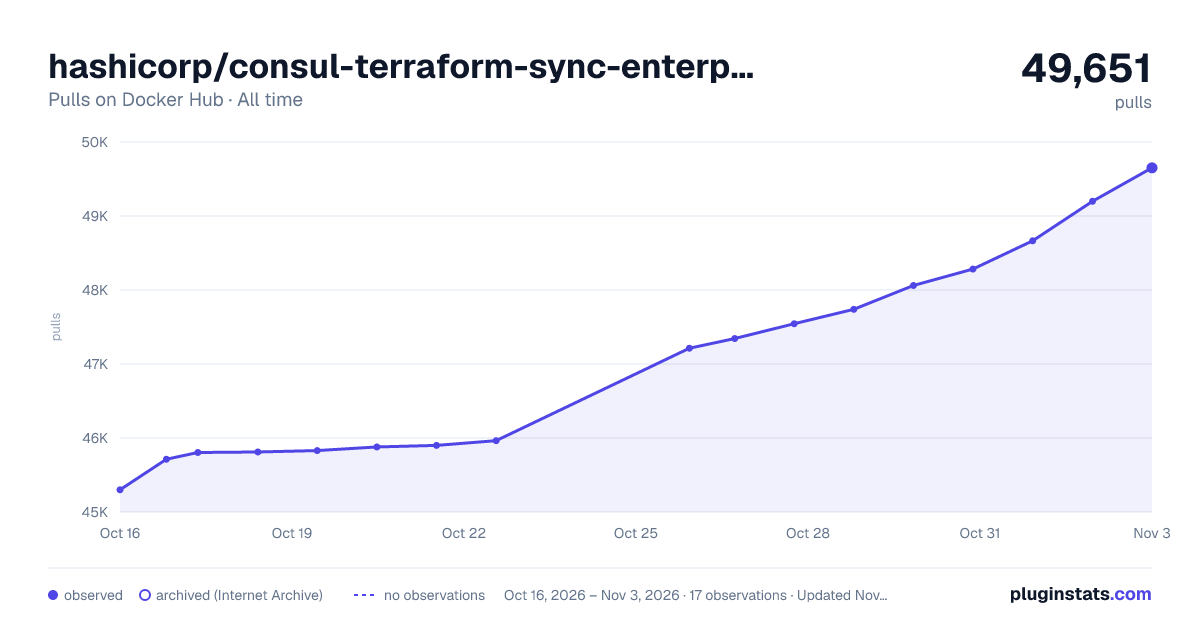

Adoption over time
7/30/90-day growth
Ranking history
Listing placement
Listing placement
Listing placement
Listing placement
Filled points are observed values; hollow points come from Internet Archive snapshots of the listing page. Dashed segments span periods with no observations — values between points are not interpolated.
Each band is one page of 20. Pulls on a linear scale. Placement is projected from pulls, so it can differ from the marketplace's own sort order. Hover a dot to see the listing.
Recent observations
Full history (6)Similar Docker Hub Integration & delivery plugins
All 20 hashicorp/consul-terraform-sync-enterprise alternativesData source
Cumulative pull counts and stars come from the public Docker Hub API. Pulls count image downloads (including automated CI pulls), not installs or users.
Listing: https://hub.docker.com/r/hashicorp/consul-terraform-sync-enterprise. First seen Oct 16, 2026; last successful collection Oct 21, 2026. See the methodology.