 PluginStats
Tracebit Community Edition installs statistics
By Tracebit · GitHub Marketplace
Tracebit Community Edition helps developers detect intrusions and supply-chain attacks across their GitHub workflows and pipe
Tracebit Community Edition has 76 recorded installs on GitHub Marketplace, ranking #558 of 1,411 tracked listings.
About Tracebit Community Edition
Use Tracebit Community Edition and the Community Edition GitHub Action to safely and automatically inject AWS canary credentials (honeytokens) into your build pipelines to detect supply chain attacks. Using Tracebit, you can quickly pinpoint the exact workflow involved in the credential compromise.
Capabilities
• Workflow scanning: Automatically analyses your GitHub Actions workflows to identify where canary credentials (honeytokens) should be deployed. • One-click canary deployment: Triggers a PR to inject the Tracebit Community Action across your workflows. • Continuous coverage monitoring: Tracks which workflows have canaries installed and flags gaps in coverage. • Supply chain attack detection: When a canary credential is used, Tracebit alerts you with full context: repo, workflow, job, commit SHA, and run ID.
Benefits
• Catch supply chain attacks early: Canary credentials act as tripwires. If a compromised dependency, malicious GitHub Action, or poisoned runner exfiltrates secrets, you get an immediate, high-confidence alert. • Cover every exfiltration surface: The action writes canary AWS credentials to ~/.aws/credentials, exports them as environment variables, and holds them in runner process memory, covering credential file sweeps, env var dumps, and /proc/<pid>/mem scraping. • Minimal setup, broad coverage: One organisation secret and a single PR per repo. Tracebit handles credential issuance, rotation, and monitoring. • Pinpoint the exact compromise: Each set of canary credentials is unique per run and tagged with repo, workflow, job, SHA, and run ID, so you know exactly which pipeline run was compromised and when.
Getting Started
Setup Process:
• Register for Tracebit Community Edition to get your API token. • Install the Tracebit GitHub App on your organisation or repositories. • Tracebit scans your workflows and shows you where canaries can be deployed. • Choose your workflows and trigger Tracebit to raise a PR that adds the action in the right place. • Merge the PR. Tracebit continuously monitors your coverage and alerts on any credential use.
Description from the GitHub Marketplace listing.
- Security
README badge
Show your rank in a README or on your website. The badge updates automatically.
Charts
Images: 30d · 1y · all time · 1600×900 dark


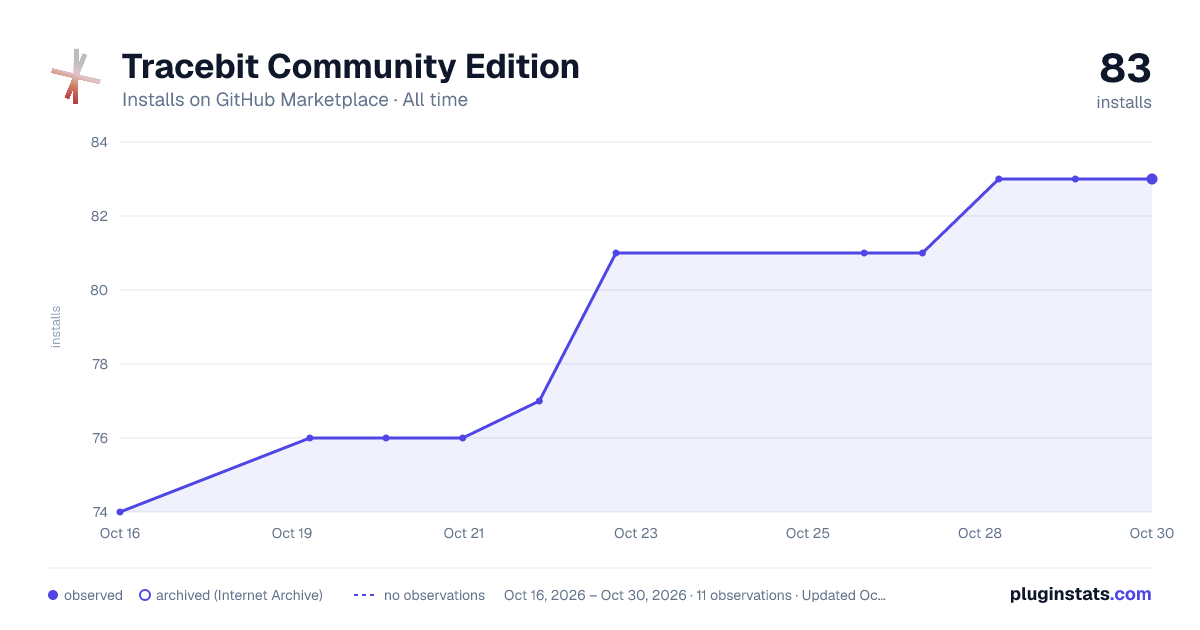

Adoption over time
7/30/90-day growth
Ranking history
Listing placement
Filled points are observed values; hollow points come from Internet Archive snapshots of the listing page. Dashed segments span periods with no observations — values between points are not interpolated.
Each band is one page of 20. Installs on a linear scale. Placement is projected from installs, so it can differ from the marketplace's own sort order. Hover a dot to see the listing.
Recent observations
Full history (3)Similar GitHub Marketplace plugins
All 20 Tracebit Community Edition alternativesData source
Install counts (installations of each GitHub App across accounts and organizations) are read from public GitHub Marketplace listing pages. GitHub does not publish ratings. Category positions reflect GitHub's own popularity sort.
Listing: https://github.com/marketplace/tracebit-community-edition. First seen Oct 16, 2026; last successful collection Oct 20, 2026. See the methodology.