 PluginStats
All Quiet installs statistics
By All Quiet (2 listings) · GitHub Marketplace
Connect GitHub with All Quiet to sync incidents and issues. Speed up resolution with automated, bidirectional workflows
All Quiet has 3 recorded installs on GitHub Marketplace, ranking #1232 of 1,411 tracked listings.
About All Quiet
All Quiet for GitHub
Connect All Quiet with GitHub to automate your incident management. This integration syncs incidents and GitHub issues to keep your development and operations teams aligned.
Key Features
• Bidirectional Sync: Create GitHub issues from incidents and vice versa. • State Alignment: Sync status changes and post incident activity as comments. • Smart Routing: Map repositories to specific teams for faster resolution.
Streamline your workflow.
All Quiet for GitHub
Connect All Quiet with GitHub to automate incident response. This integration links your development and operations workflows. Ensure critical incidents receive immediate attention without manual overhead.
Capabilities
Synchronize your tools to keep teams aligned during outages.
• Bidirectional Sync: Create GitHub issues from All Quiet incidents and All Quiet incidents from GitHub issues. • State Alignment: Synchronize status updates across both platforms automatically based on your configuration. • Activity Mirroring: Post incident activity to GitHub issues as comments to maintain a single source of truth. • Smart Routing: Map specific repositories to All Quiet to ensure alerts reach the correct developers.
Benefits
Bridge the gap between monitoring and resolution.
• Reduced MTTR: Speed up resolution by notifying the right people instantly within existing workflows. • Unified Visibility: Operations teams monitor incidents in All Quiet while developers stay focused in GitHub. • Data Integrity: Eliminate manual data entry and the risk of outdated status information across tools.
Getting Started
Requirements:
• Plan: Active All Quiet subscription. • User Permissions: GitHub Organization Owner and All Quiet Team or Organization Administrator.
Setup Process:
• Navigate to Integrations in All Quiet and create a new GitHub outbound integration. • Select your Root Team to define the primary owner of the integration. • Click Install on GitHub and grant access to your chosen repositories. • Configure state sync options and labels in All Quiet to finalize the connection.
Example Workflows
Try these actions to streamline your response:
• Forward an All Quiet incident to GitHub to create a linked developer task. • Close a GitHub issue to automatically resolve the corresponding All Quiet incident. • Comment on an incident in All Quiet to update the GitHub issue activity log.
Description from the GitHub Marketplace listing.
- Monitoring
README badge
Show your rank in a README or on your website. The badge updates automatically.
Charts
Images: 30d · 1y · all time · 1600×900 dark


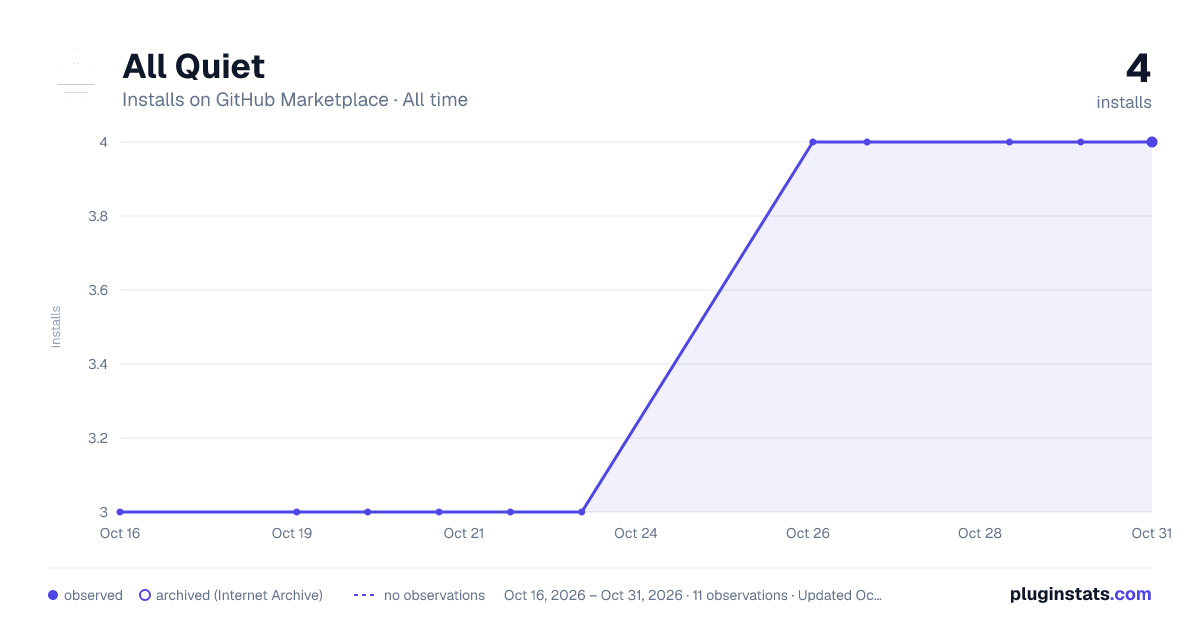

Adoption over time
7/30/90-day growth
Ranking history
Listing placement
Filled points are observed values; hollow points come from Internet Archive snapshots of the listing page. Dashed segments span periods with no observations — values between points are not interpolated.
Each band is one page of 20. Installs on a linear scale. Placement is projected from installs, so it can differ from the marketplace's own sort order. Hover a dot to see the listing.
Recent observations
Full history (3)Similar GitHub Marketplace plugins
All 20 All Quiet alternativesData source
Install counts (installations of each GitHub App across accounts and organizations) are read from public GitHub Marketplace listing pages. GitHub does not publish ratings. Category positions reflect GitHub's own popularity sort.
Listing: https://github.com/marketplace/all-quiet. First seen Oct 16, 2026; last successful collection Oct 20, 2026. See the methodology.