 PluginStats
GitMe Developer Analytics installs statistics
By GitMe Performance Tracking · GitHub Marketplace
AI-measured developer productivity. Alternative to GitPrime, Pluralsight Flow, Code Climate Velocity, Waydev, Git Prime
GitMe Developer Analytics has 34 recorded installs on GitHub Marketplace, ranking #739 of 1,411 tracked listings.
About GitMe Developer Analytics
💻 Leading a dev team but still guessing how much effort they put in?
Let’s be honest.
❌ Story points aren’t cutting it.
❌ Neither are commit counts.
✅ It’s time to go deeper — with Real Effort Value.
With GitMe, you get AI-powered insights that reveal the true workload.
No more assumptions. No more blind spots.
👀 See the effort.
🎯 Recognize the real impact.
📊 Make smarter decisions.
Let us Git you the truth.
Capabilities
• Analyze coding efforts with AI to extract effort and contribution value • Categorize efforts as Feature, Bugfix, Refactor, Docs, and more • Track code retention to highlight lasting contributions • Attribute effort at developer, team, and organizational levels
Benefits
• Effort Transparency: See the real workload behind each commit with AI-estimated Real Effort Value. • Team Visibility: Identify under-recognized contributors and rebalance workload fairly. • Organizational Insight: Break down impact by role (Frontend, Backend, QA, etc.) and structure (internal, outsourced). • Code Health: Retention analysis helps detect fragile or high-churn areas in your codebase.
Getting Started
Requirements:
• Plan: Free plan available; starter, business and enterprise plans required for advanced insights • User Permissions: Requires access to: • Repository permissions: metadata, contents, commit statuses • Organization permissions: members • Account permissions: email address • Availability: Public Beta
Setup Process:
• Install GitMe from GitHub Marketplace • Authorize access to selected repositories • Setup your organization on the following panel
You can use GitMe for the following purposes:
• Team-Level Effort Breakdown
Understand how much effort your frontend, backend, and QA teams contributed in the last sprint.
• Individual Developer Performance
Identify which developers delivered the highest impact over the past 30 days.
• Outsource vs In-house Comparison
Compare long-term code retention and contribution between outsourced and internal developers.
• Managed Services Tracking
Measure developer effort on helpdesk or maintenance work, categorized by ticket or task type.
• Code Health & Retention Analysis
Spot modules with low-effort, high-churn patterns to detect unstable or high-risk code areas.
Description from the GitHub Marketplace listing.
- Code review
- Time tracking
README badge
Show your rank in a README or on your website. The badge updates automatically.
Charts
Images: 30d · 1y · all time · 1600×900 dark


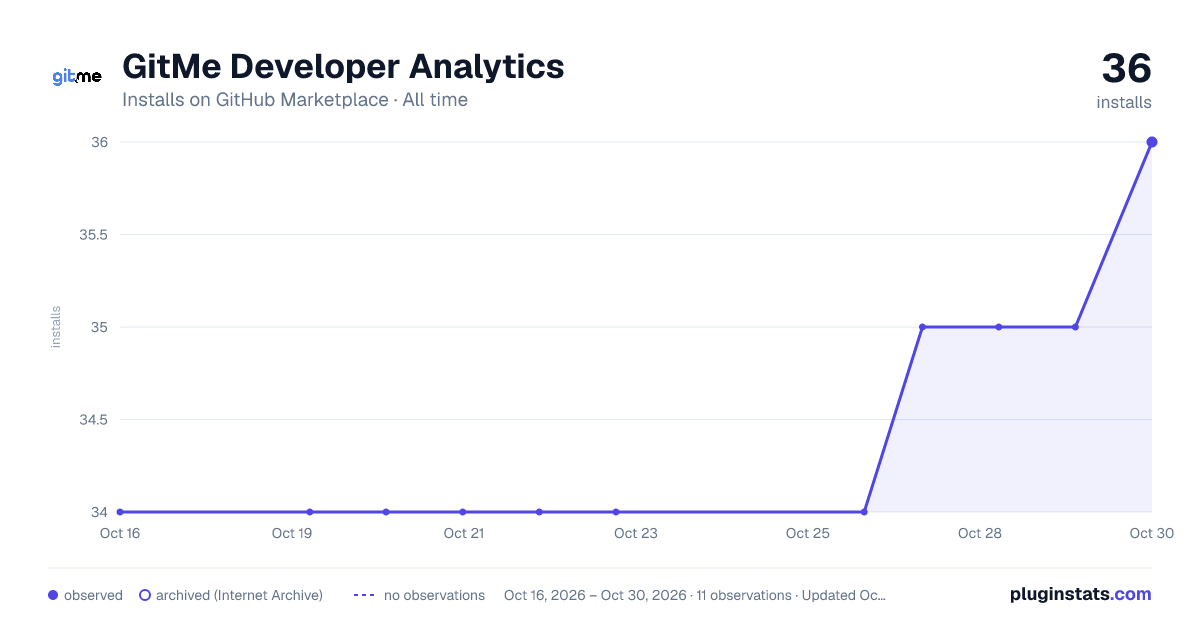

Adoption over time
7/30/90-day growth
Ranking history
Listing placement
Filled points are observed values; hollow points come from Internet Archive snapshots of the listing page. Dashed segments span periods with no observations — values between points are not interpolated.
Each band is one page of 20. Installs on a linear scale. Placement is projected from installs, so it can differ from the marketplace's own sort order. Hover a dot to see the listing.
Recent observations
Full history (4)Similar GitHub Marketplace plugins
All 20 GitMe Developer Analytics alternativesData source
Install counts (installations of each GitHub App across accounts and organizations) are read from public GitHub Marketplace listing pages. GitHub does not publish ratings. Category positions reflect GitHub's own popularity sort.
Listing: https://github.com/marketplace/gitme-ai-effort. First seen Oct 16, 2026; last successful collection Oct 21, 2026. See the methodology.